Keyword Research for Amazon Without Expensive Tools
Table of Contents
You have a product ready to sell on Amazon, or your existing listing is getting zero traffic. You need to know which search terms customers actually use to find products like yours.
If you choose the wrong keywords, your product will be invisible to buyers no matter how competitive your price or how good your product quality. Months of inventory investment sit at risk. Paid tools cost $50-$300 per month, but you are unsure if they are necessary or which one is worth the investment. Meanwhile, competitors seem to have discovered some secret method for getting their products ranked.
Searching “Amazon keyword research” returns dozens of tool recommendations, each claiming to be essential. Every article assumes you have a budget for software subscriptions, or already understand terms like “backend keywords” and “indexing.” No one explains whether free methods can actually work, or how many keywords you actually need.
This guide shows you exactly how to perform Amazon keyword research using both free and paid methods. You will understand which approach fits your situation, how to build a prioritized keyword list, and where to place each keyword type in your listing.
What Is Amazon Keyword Research
Amazon keyword research is the process of identifying search terms customers type into Amazon’s search bar when looking for products. These keywords determine whether your product appears in search results. Without proper keyword research, your product remains invisible regardless of quality.
Amazon’s A9 algorithm matches search queries to product listings based on keyword relevance. Your competitors are optimizing for keywords. Without research you start at a disadvantage. Wrong keywords mean zero impressions, zero traffic, zero sales even with great products.
70% of Amazon shoppers never click past the first page of results. Amazon search is the primary product discovery method, not browsing categories. Keyword placement affects both organic search and PPC advertising performance. Your listing without optimized keywords competes against hundreds of sellers who invested time in research.
How Amazon Search Works
Amazon’s A9 algorithm determines which products appear for each search query. Understanding how this system works informs every research decision you will make.
The A9 Algorithm
Amazon’s A9 algorithm determines which products appear for each search query. Primary ranking factors include keyword relevance, sales performance, and customer satisfaction. Unlike Google, Amazon prioritizes products most likely to result in purchase. The algorithm weighs keyword placement: Title carries most weight, then bullets, then backend.
Amazon makes money when customers buy, not just when they click. The algorithm favors products with proven sales history that match search intent. This means you cannot rank on keywords alone. You need keywords PLUS conversion performance. But without the right keywords, you never get the chance to prove conversion.
Where Keywords Live in Your Listing
Product Title receives the most important placement because it is visible to customers and carries highest algorithm weight. Bullet Points carry secondary weight, remain visible, and add context for both customers and the algorithm. Product Description has lower weight and is not visible on mobile devices. Backend Search Terms are invisible to customers, limited to 249 characters, and enable indexing without affecting visible content. A+ Content (Enhanced Brand Content) is available for Brand Registry sellers.
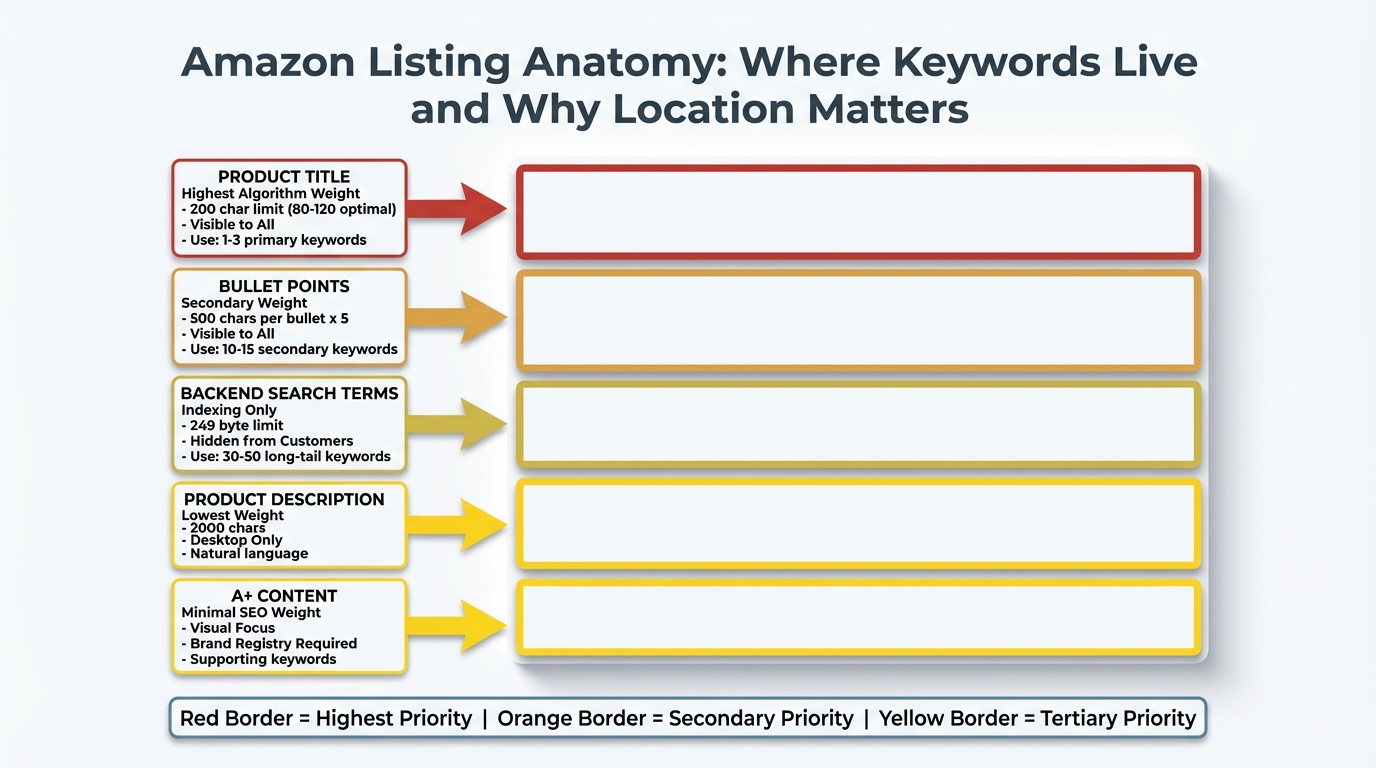
Amazon listing anatomy showing where keywords live and their relative algorithm weight
Keyword Types and Search Intent
Short-tail keywords contain 1-2 words, high search volume, and high competition. Example: “yoga mat” has 150,000+ monthly searches but established sellers dominate page one. Long-tail keywords contain 3+ words, lower volume, lower competition, and higher intent. Example: “extra thick yoga mat for bad knees” has 1,200 monthly searches but realistic ranking opportunity.
New sellers should prioritize long-tail keywords because they offer realistic ranking opportunities. Search intent differs dramatically between keyword types. “yoga mat” signals browsing behavior. “6mm cork yoga mat” signals ready to buy. The more specific the keyword, the closer the customer is to purchase decision.
| Keyword Type | Example | Monthly Searches | Competition | Best For |
|---|---|---|---|---|
| Short-tail | yoga mat | 150,000 | Very High | Established sellers |
| Mid-tail | thick yoga mat | 15,000 | High | Growing sellers |
| Long-tail | yoga mat for hot yoga non-slip | 1,200 | Low | New sellers |
Understanding how Amazon search works informs every research decision ahead. Now identify which research approach fits your situation.
Choose Your Research Method
The right keyword research method depends on your budget, product category competition, and Amazon seller experience. Here’s how to decide which approach to start with.
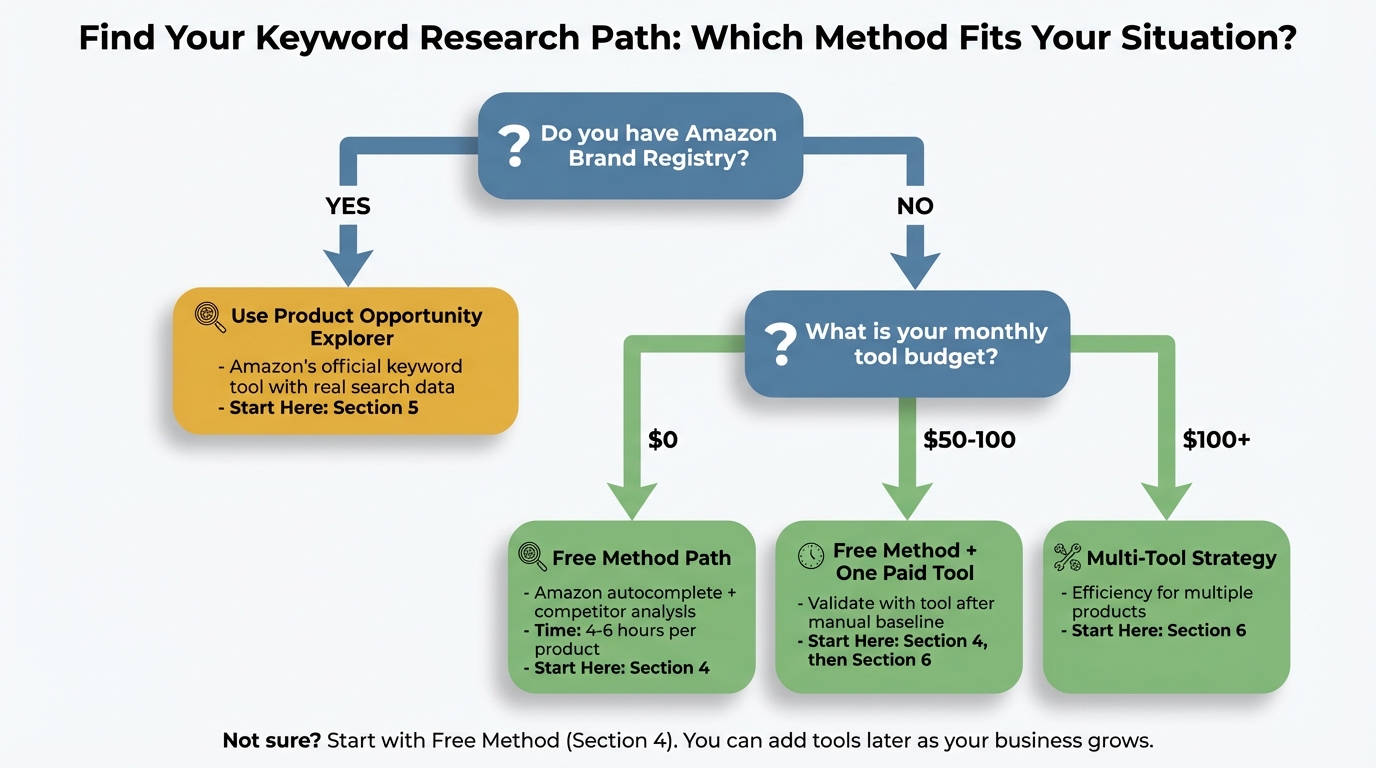
Decision flowchart guiding you to the research method that fits your situation
Path 1: Complete Beginner, No Budget
Profile: First product, $0 for tools, pre-launch stage.
Method: Amazon autocomplete plus competitor reverse engineering plus free trials.
Time Investment: 4-6 hours per product.
Expected Results: 30-50 validated keywords.
Start Here: Jump to “The Complete Free Method” section below.
Path 2: Budget for Tools, Optimizing Existing Listing
Profile: Product already live, modest budget, seeking data validation.
Method: Free method baseline plus one paid tool for gap analysis.
Time Investment: 2-3 hours per product.
Expected Results: 75-100 prioritized keywords.
Start Here: Read Free Method section first, then “Paid Tool Selection Framework.”
Path 3: Brand Registry, Multiple Products
Profile: Trademark registered, scaling operations, efficiency priority.
Method: Amazon Product Opportunity Explorer plus paid tools for automation.
Time Investment: 1-2 hours per product.
Expected Results: 100+ keywords with confidence scoring.
Start Here: “Amazon Product Opportunity Explorer” section below.
Even if you plan to use paid tools, read the free method section first. Manual research teaches fundamental skills that make tool data easier to interpret.
The Complete Free Method
Amazon’s built-in features and publicly visible data provide real customer search behavior at zero cost. This method requires more manual effort than paid tools, but produces quality results sufficient for most new sellers. You will use Amazon autocomplete, competitor listings, and Search Query Performance data to build your keyword list.
Expected Time Investment: 4-6 hours for comprehensive research.
Required Tools: Spreadsheet template (download link), Amazon Seller Central access.
Best For: Pre-launch products, budget-constrained sellers, learning fundamentals.
Step 1: Seed Keyword Generation
A seed keyword is your product category or primary description in 1-3 words. This starting point enables you to expand research systematically. Example: Selling yoga mats means your seed keyword is “yoga mat.”
How to generate seed keywords:
- List obvious product names that your manufacturer calls it
- Add common variations like synonyms and alternative terms
- Include use-case descriptors showing who uses it, where, and when
- Note competitor category placements to see what section top sellers list in
Example for yoga mat product:
- Seed keywords: yoga mat, exercise mat, fitness mat, workout mat, pilates mat
- Use-case seeds: hot yoga mat, travel yoga mat, home gym mat
- Material seeds: rubber yoga mat, cork yoga mat, TPE yoga mat
Add these seed keywords to Column A of your research template. Aim for 10-15 starting terms.
Step 2: Amazon Autocomplete Harvesting
Amazon shows autocomplete suggestions based on actual customer searches. High-frequency searches appear first. Autocomplete reveals customer language patterns showing not how you describe it, but how they search for it.
Manual Method (Step-by-Step):
2.1 Basic Autocomplete:
- Open Amazon.com in incognito or private browsing to avoid personalized results
- Type seed keyword slowly into search bar
- Record all suggested completions that appear
- Repeat for each letter of alphabet: “yoga mat a”, “yoga mat b”, “yoga mat c”
- Note suggestions that repeat because repetition indicates higher search frequency
Example Output:
- “yoga mat” shows autocomplete: yoga mat thick, yoga mat bag, yoga mat cleaner, yoga mat for hot yoga
- “yoga mat e” shows: yoga mat extra thick, yoga mat eco friendly, yoga mat exercise
2.2 Wildcard Method:
- Try seed keyword with spaces: “_ yoga mat”, “yoga mat _”, “yoga _ mat”
- This captures keywords where your product is part of longer phrase
- Example: “yoga mat for” reveals “yoga mat for men”, “yoga mat for bad knees”
2.3 Competitor Product Autocomplete:
- Search for top competitor’s main keyword
- Record autocomplete suggestions
- Identifies what customers search for AFTER seeing competitor products
Time Investment: 1-2 hours for thorough autocomplete research.
Expected Results: 50-100 keyword variations from single seed keyword.
Add all autocomplete results to Column B of template. Do not filter yet. Record everything.
Step 3: Competitor Reverse Engineering
Successful competitors already solved the keyword research problem. Their titles and bullets contain proven keywords. BSR (Best Sellers Rank) indicates how well their keyword strategy works.
Step-by-Step Process:
3.1 Identify Target Competitors:
- Search your primary seed keyword on Amazon
- Filter by average customer rating (4.0+ stars) and number of reviews (200+ reviews)
- Select 5-10 competitor products with strong BSR in your category
- Avoid products with advantages you don’t have like celebrity endorsements or 10,000+ reviews
Criteria for Competitor Selection:
- Same price range as your product (similar, not 10x difference)
- Similar product features
- Launched within last 2 years because keyword strategies evolve
- Active advertising presence shown by sponsored product badge
3.2 Extract Keywords from Competitor Listings:
- Copy competitor product title
- Copy all bullet points
- Note repeated phrases because repetition indicates primary keywords
- Identify descriptors you missed like material types, use cases, sizes
What to Extract:
- Exact phrases that appear in title (highest priority keywords)
- Benefit statements from bullets (often contain keyword plus modifier)
- Technical specifications mentioned (dimensions, weight, materials)
- Use case keywords (who it’s for, where to use it)
Example Analysis:
Competitor title: “YOGASTRONG Extra Thick Yoga Mat - 1/4 Inch (6mm) Non-Slip Exercise Mat for Home Workouts, Hot Yoga, Pilates - Eco-Friendly TPE Material - Includes Carrying Strap”
Keywords extracted:
- extra thick yoga mat (primary)
- 1/4 inch yoga mat (specification search)
- 6mm yoga mat (metric variation)
- non-slip exercise mat (alternative category)
- home workout mat (use case)
- hot yoga mat (use case)
- pilates mat (cross-category)
- eco-friendly yoga mat (material benefit)
- TPE yoga mat (material type)
- yoga mat with strap (accessory inclusion)
3.3 Search Volume Estimation (Without Tools):
- Compare number of search results for each keyword
- Note autocomplete position because earlier suggestions mean higher volume
- Check number of sponsored products for keyword because more ads mean more searches mean more competition
Add competitor keywords to Column B. Mark duplicates. If 5+ competitors use same keyword, that’s high-priority validation.
Step 4: Amazon Search Term Report Mining
Availability: Requires active Amazon PPC advertising campaigns. Data available in Seller Central > Advertising > Campaign Manager > Reports. Only applicable if you already launched product and ran ads.
Why this data is gold: Shows EXACT terms customers searched before clicking your ad. Reveals unexpected keyword opportunities you didn’t target. Indicates which keywords convert purchases versus just get clicks.
How to Extract Keyword Ideas:
- Download Search Term Report (last 30-60 days)
- Filter by metrics: Impressions > 10, CTR > 0.5%
- Identify search terms with Add-to-Cart or Purchases
- Note terms you didn’t intentionally target (opportunity gap)
What to Look For:
- High impression, low click terms (maybe wrong keyword selection)
- High click, low conversion terms (traffic but wrong intent)
- Low impression, high conversion terms (hidden gems to expand)
Add Search Term Report keywords to Column B. Mark conversion keywords with asterisk. These are validated by actual customer behavior.
Step 5: Keyword List Consolidation and Prioritization
You Now Have:
- Seed keywords (10-15)
- Autocomplete results (50-100)
- Competitor keywords (30-50 per competitor)
- Search term report data (if applicable)
- Total: 150-300 raw keywords
Consolidation Process:
5.1 Remove Duplicates:
- Merge exact duplicates
- Keep singular and plural versions separate because Amazon treats them differently
- Note keyword frequency showing how many sources mentioned it
5.2 Eliminate Irrelevant Keywords:
- Delete keywords unrelated to your actual product
- Remove keywords for features you don’t have
- Cut keywords targeting wrong customer segment
5.3 Group by Keyword Type:
- Short-tail (1-2 words)
- Mid-tail (3 words)
- Long-tail (4+ words)
5.4 Assess Relevance (1-5 Score):
Create scoring system:
- 5 = Exactly describes your product
- 4 = Describes most features
- 3 = Describes some features or use cases
- 2 = Tangentially related
- 1 = Barely relevant
Only keep keywords scoring 3+.
5.5 Estimate Competition Level:
Without tools, use proxy indicators:
- High competition: 50,000+ search results, 10+ sponsored products on page 1
- Medium competition: 10,000-50,000 results, 5-10 sponsored products
- Low competition: <10,000 results, <5 sponsored products
Prioritization Matrix:
Combine Relevance Score plus Competition Level:
- Target: High relevance (4-5) plus Low-Medium competition
- Secondary: Medium relevance (3) plus Low competition
- Defer: High relevance plus High competition (need more reviews or sales history first)
Complete Columns C-F of template: Search Volume Estimate, Competition Level, Relevance Score, Priority Rank.

The keyword pyramid showing how to structure your research from broad base to focused peak
Target Output:
- 50-100 prioritized keywords
- 1-3 primary keywords (for title)
- 10-15 secondary keywords (for bullets and backend)
- 30-50 long-tail keywords (for backend and future content)
Step 6: Validation Checks
Keyword validation prevents wasting character limits on low-value keywords. Single-source data may be inaccurate. Customer language evolves over time.
Three Validation Methods:
6.1 Cross-Reference Test:
- Does keyword appear in autocomplete? (Yes = validated by Amazon)
- Do multiple competitors use it? (Yes = validated by market)
- Does it feel natural when you speak it aloud? (Yes = natural language)
6.2 Indexing Test (For Live Listings):
- Search: [Your ASIN] + [keyword] on Amazon
- If your product appears, you’re indexed for that keyword
- If not, keyword isn’t in your listing or Amazon doesn’t associate it with you
6.3 Results Quality Test:
- Search the keyword on Amazon
- Review first page results: Are they similar to your product?
- If results show completely different products, keyword may be too broad or ambiguous
Pass/Fail Criteria: Keyword must pass 2 of 3 validation tests to keep. If fails all three, remove from list even if you like it.
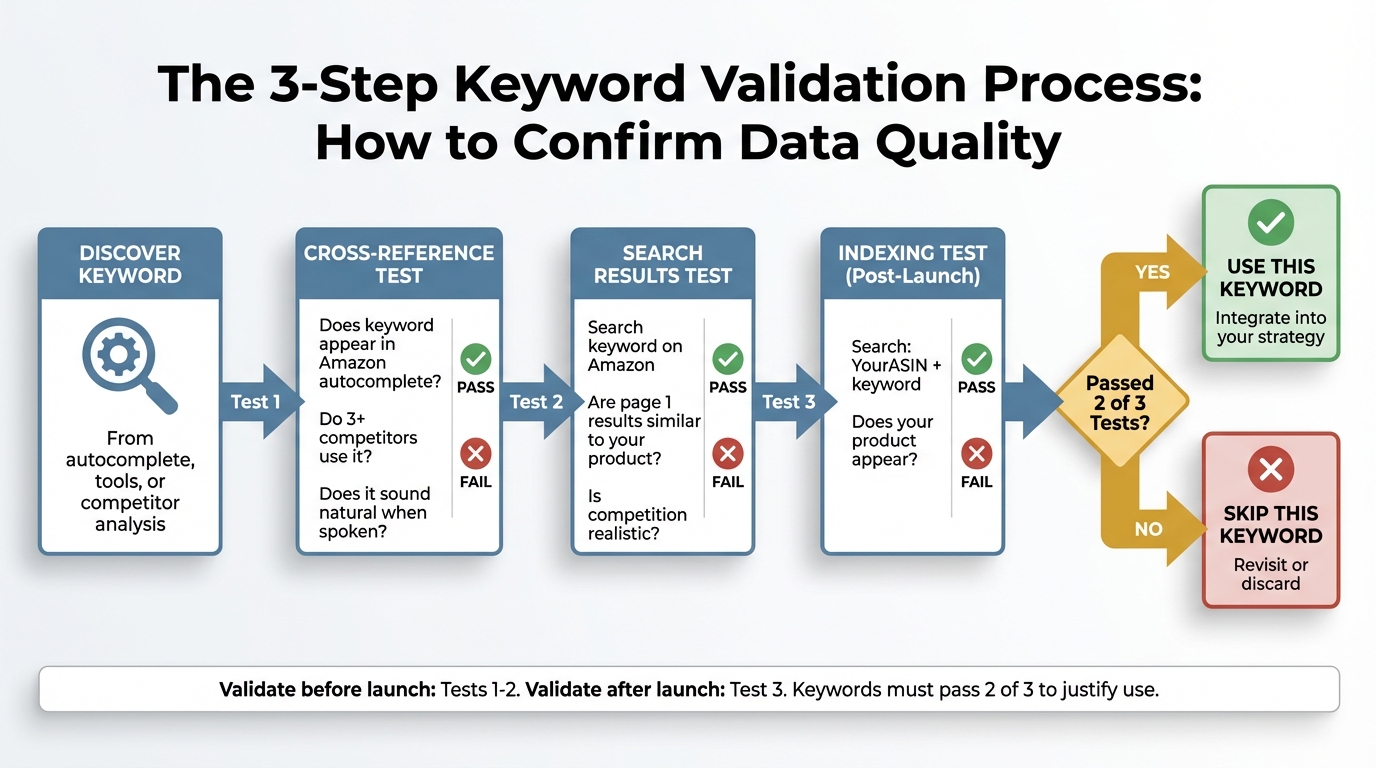
The validation process flow ensuring keyword quality before committing to your listing
Add Validation Status column to template. Mark Pass or Fail for each test.
Expected Results from Free Method
Realistic Outcomes: 50-80 validated keywords for most products. 5-10 high-confidence primary keywords. Sufficient data to optimize listing for launch. Foundation for future paid tool validation.
What Free Method Lacks: Exact search volume numbers (you have estimates, not data). Trend analysis showing seasonal changes or growth patterns. Competitor PPC strategy insights. Automation for scaling to multiple products.
When to Upgrade to Paid Tools: After implementing free method and gathering 30 days of performance data. When managing 5+ products because time efficiency becomes ROI-positive. If category competition requires more sophisticated gap analysis. When budget allows $50-100 per month tool investment.
The free method provides a solid foundation. If you need more data or efficiency, evaluate paid tool options next.
Amazon’s Native Keyword Tools
If you have Amazon Brand Registry (requires registered trademark), you gain access to Amazon’s proprietary keyword research tools. These tools use Amazon’s internal data, making them more accurate than third-party estimates. If you don’t have Brand Registry yet, consider the trademark registration investment ($250-$400) before investing in paid third-party tools.
Product Opportunity Explorer
Product Opportunity Explorer is Amazon’s official keyword research tool for Brand Registry sellers. Launched 2020 and continuously improved. Uses Amazon’s actual search data, not estimates.
Access Path: Seller Central > Brands > Brand Analytics > Product Opportunity Explorer.
Key Features:
1. Search Term Volume: Shows search frequency rank (top 1-3, top 4-10, etc.). Data from last 90 days. Includes seasonal trend indicators.
2. Top Clicked Products: Shows which ASINs get clicks for each search term. Click share percentage. Conversion share percentage.
3. Customer Demographics: Age distribution of searchers. Household income brackets. Prime vs non-Prime membership status.
How to Use for Keyword Research:
Step 1: Niche Discovery:
- Enter your product category in search field
- Filter by “Search Volume” (High to Low)
- Note top 20-30 search terms in your niche
Step 2: Gap Analysis:
- For each high-volume search term, review top clicked products
- Identify terms where top products have low conversion share (opportunity)
- Check if your product meets unmet need in search results
Step 3: Keyword Extraction:
- Export search term data to spreadsheet
- Filter by minimum search volume threshold
- Cross-reference with your product features
Advantages Over Third-Party Tools: Amazon’s actual data, not algorithmic estimates. Free with Brand Registry, no monthly subscription. Updated weekly, more current than tool databases. Includes customer demographic insights.
Limitations: Requires Brand Registry (trademark requirement, 4-6 month registration process). Less granular than specialized tools for some features. No direct competitor ASIN tracking. Learning curve for dashboard navigation.
Export Product Opportunity Explorer results and add to Column B of template with ‘POE-Validated’ tag.
Brand Analytics
Brand Analytics shows top search terms in your category. Available to Brand Registry sellers. Updated weekly.
Access Path: Seller Central > Brands > Brand Analytics > Amazon Search Terms.
Data Provided: Top 1 million search terms across Amazon. Search frequency rank showing approximate position. Top 3 clicked ASINs for each term. Click share and conversion share percentages.
How to Use:
- Filter by product category or department
- Identify terms relevant to your product
- Analyze click distribution (concentrated or dispersed competition)
- Note terms where top 3 don’t dominate (entry opportunity)
Use Brand Analytics to validate keywords found through other methods, not as primary research source. Dataset is too broad for efficient searching.
Search Query Performance Report
Availability: Requires active Amazon Sponsored Products campaigns. Free data from your own campaigns. Most actionable keyword source if you’ve launched.
Access Path: Seller Central > Advertising > Campaign Manager > Reports > Search Query Performance.
What It Shows: Exact customer search terms that triggered your ads. Impressions, clicks, CTR, spend by search term. Add-to-Cart and Purchase data. ACoS (Advertising Cost of Sale) by keyword.
How to Use for Organic Keyword Optimization:
- Identify high-impression terms you didn’t explicitly target (auto campaign discoveries)
- Find high-conversion terms to prioritize in organic listing
- Discover negative keywords (high spend, low conversion means wrong intent)
- Validate keyword assumptions with actual performance data
Keyword Research Application: Add converting search terms to your product listing backend keywords. Use high-impression terms to validate title or bullet keyword choices. Build content around terms that show Add-to-Cart but not Purchase (need more info to convert).
Limitation: Only available AFTER you’ve launched and run advertising. This is a validation and expansion tool, not a pre-launch research tool.
Amazon’s native tools are excellent if you have access. For sellers without Brand Registry or those needing more features, third-party paid tools offer additional capabilities.
Paid Keyword Research Tools
Paid keyword research tools cost $50-$300+ per month. Before investing, understand what they provide beyond free methods, and whether those features justify the cost for your specific situation. This section helps you decide IF you need paid tools, which features matter, and how to evaluate options.
What Paid Tools Provide
Core Value Propositions:
1. Search Volume Quantification:
- Free methods give relative indicators (“high” vs “low”)
- Paid tools estimate monthly search volume (example: “15,000 searches per month”)
- Accuracy varies by tool (algorithm-based estimates, not Amazon official data)
Value Assessment: Important for prioritization, but not essential for basic listing optimization.
2. Competitor Keyword Tracking:
- Reverse ASIN lookup: Enter competitor ASIN, see all keywords they rank for
- Indexed keyword extraction
- Ranking position tracking over time
Value Assessment: High value for competitive categories, moderate value for niches.
3. Keyword Trend Analysis:
- Historical search volume patterns
- Seasonal trend identification
- Growth or decline indicators
Value Assessment: Critical for seasonal products, low value for evergreen products.
4. PPC Keyword Recommendations:
- Suggested bid ranges
- Competition level for advertising
- Estimated cost-per-click
Value Assessment: Essential if running large ad campaigns, unnecessary for organic-only strategy.
5. Automation and Efficiency:
- Bulk keyword generation
- Automated competitor tracking
- Report scheduling
Value Assessment: ROI-positive when managing 5+ products, inefficient for single products.
6. Listing Optimization Scoring:
- Keyword density analysis
- Listing quality score vs competitors
- Character limit utilization tracking
Value Assessment: Helpful for beginners, less valuable once you understand fundamentals.
ROI Decision Framework
Calculate Your Tool Investment Threshold:
Example:
- Product revenue: $3,000 per month
- Number of products: 2
- Margin: 30%
- Maximum tool budget: ($3,000 × 2 × 0.30) × 0.01 = $18 per month
Interpretation: This seller should start with free methods or low-cost tools under $20 per month. $100+ tools not yet justified by revenue.
Time Value Consideration:
- Free method requires 4-6 hours per product
- Paid tool reduces to 1-2 hours per product
- Time saved: 3-4 hours per product
If your time is worth $25 per hour:
- 4 hours saved = $100 value
- $50 per month tool justified if you research 1+ products per month
- $200 per month tool justified if you research 4+ products per month
Decision Matrix:
| Scenario | Free Method | Low-Cost Tool ($20-50) | Mid-Tier Tool ($50-150) | Premium Tool ($150-300+) |
|---|---|---|---|---|
| 1-2 products, pre-launch, tight budget | Start Here | Consider after 30 days | Wait until revenue proven | Not justified |
| 3-5 products, active sales, modest budget | Baseline data | Recommended | Evaluate based on time savings | Not yet |
| 6+ products, scaling operation, flexible budget | Too slow | Too limited | Recommended | Evaluate for advanced features |
| Agency managing multiple clients | Too slow | Too limited | Minimum tier | Recommended |
When NOT to Buy Tools:
- You haven’t completed free method first (don’t know what good data looks like)
- Product hasn’t launched yet (no performance baseline to validate against)
- Monthly tool cost exceeds 5% of monthly product revenue
- You’re evaluating tools based on feature lists, not specific needs
When to Buy Tools:
- Managing 3+ products and time efficiency matters
- Highly competitive category requires gap analysis
- Running significant PPC budgets ($500+ per month) and need bid optimization
- Need trend data for seasonal product planning
Tool Evaluation Criteria
Essential Features (Must-Have):
- Reverse ASIN lookup (competitor keyword extraction)
- Search volume estimates for Amazon specifically (not Google or web data)
- Keyword suggestion generation beyond obvious terms
- Export functionality (get your data out to spreadsheet)
Valuable Features (Nice-to-Have):
- Indexing verification (checks if you rank for keywords)
- Ranking position tracking over time
- PPC bid recommendations
- Seasonal trend visualization
Premium Features (Only If Needed):
- Multi-marketplace support (international Amazon sites)
- API access for automation
- Team collaboration features
- Historical data archives
Red Flags (Avoid These Tools):
- No free trial or money-back guarantee (can’t test before committing)
- Only annual pricing (locks you in without monthly validation)
- Feature lists focus on quantity over quality
- No transparent methodology for search volume estimates
- Affiliate-heavy review presence (biased recommendations)
Trial Testing Protocol:
Week 1-2: Baseline Comparison
- Complete free method research for one product (create keyword list)
- Sign up for tool free trial
- Research same product using tool
- Compare results: How many new keywords did tool find? How different are search volume estimates?
Week 3: Validation Testing
- Implement keywords from tool
- Launch or update listing
- Monitor impressions and traffic changes
- Check if tool’s “high volume” keywords actually drive traffic
Decision Point:
- Tool found 20+ valuable keywords you missed: Consider subscription
- Tool found fewer than 10 new keywords: Free method sufficient
- Tool data contradicts actual performance: Don’t trust it
Tool Categories and Use Cases
Category 1: All-in-One Suites (Helium 10, Jungle Scout, Viral Launch)
Price Range: $50-$200+ per month.
Best For: Sellers managing multiple aspects (research, listing optimization, inventory, PPC).
Keyword Features: Comprehensive but sometimes redundant.
Consideration: Only justified if you use 3+ modules regularly. Otherwise paying for unused features.
Category 2: Keyword-Focused Specialists (Sonar, MerchantWords, KeywordTool.io)
Price Range: $20-$100 per month.
Best For: Sellers only needing keyword research, no other Amazon tools.
Keyword Features: Deep, focused databases. More frequent updates.
Consideration: Better value if keyword research is your only tool need.
Category 3: Free Tools with Limitations (Amazon Autocomplete scrapers, limited reverse ASIN)
Price Range: $0-$20 per month.
Best For: Validating free method results, supplementing manual research.
Keyword Features: Basic but sufficient for 1-3 products.
Consideration: Start here before committing to paid tiers.
Category 4: Agency or Enterprise Tools
Price Range: $300+ per month.
Best For: Agencies managing 10+ client accounts or brands with 50+ products.
Keyword Features: API access, bulk operations, team collaboration.
Consideration: Not for individual sellers.
Whether you use free methods or paid tools, the next step is identical: organizing and applying your keywords strategically.
How to Validate Keyword Data Quality
Keyword tools provide estimates, not guarantees. Amazon doesn’t share official search volume data, so all third-party tools use algorithms to predict search behavior. Here’s how to assess data quality and cross-validate before committing keywords to your listing.
Cross-Reference Validation Method
The Problem:
- Tool A says “yoga mat” has 100,000 monthly searches
- Tool B says 250,000
- Tool C says 65,000
- Which is correct?
The Solution: Triangulation. Use multiple data sources to identify consensus.
Step 1: Compare 3 Sources
- Amazon autocomplete position (earlier suggestion = higher volume)
- Number of sponsored products on page 1 (more ads = more searches)
- At least one paid tool estimate
Step 2: Identify Outliers
- If all three sources agree (high, medium, or low), data is validated
- If one source contradicts others, investigate why
- If all three disagree wildly, keyword may have inconsistent search patterns
Step 3: Confidence Scoring
Assign confidence levels:
- High confidence (3 of 3 sources agree): Use keyword prominently (title or bullets)
- Medium confidence (2 of 3 agree): Use in backend or secondary positions
- Low confidence (no agreement): Skip or test in PPC first
Add ‘Confidence Score’ column to template: High, Medium, or Low based on source agreement.
Reality Testing
After implementing keywords, compare tool predictions to reality:
Test 1: Impression Validation
- Tool predicted “high volume” keyword
- Your listing gets fewer than 10 impressions in first week
- Likely causes: Tool overestimated, or your listing not ranking yet
Test 2: Conversion Validation
- Tool suggested keyword with “high buyer intent”
- Keyword drives traffic but zero purchases
- Likely causes: Wrong customer segment or misleading keyword
Test 3: Competition Validation
- Tool rated keyword “low competition”
- Page 1 is all established sellers with 1,000+ reviews
- Likely causes: Tool measures wrong competition metric
When to Trust Tool Data: Tool’s predictions match your performance data after 30 days. Multiple products show consistent tool accuracy. Tool methodology is transparent and regularly updated.
When to Distrust Tool Data: Significant discrepancies between predictions and reality. Tool hasn’t updated data in 6+ months. No methodology explanation provided.
Action Plan for Bad Data:
Don’t abandon keywords immediately. Test in PPC first:
- Run Manual campaign targeting suspicious keyword
- Set low daily budget ($5-10)
- Monitor impressions and CTR for 7 days
- If impressions fewer than 10, keyword likely low-volume (remove from organic listing)
- If impressions high but CTR under 0.3%, keyword wrong intent (remove)
Red Flags in Keyword Data
Warning Signs:
1. Perfect Round Numbers: Tool shows “100,000” or “50,000” exact searches. Real data is rarely perfectly round. Indicates algorithmic estimation, not actual data.
2. Zero Competition Keywords with High Volume: Tool claims 10,000 searches but no competitor ranks for it. Unlikely scenario in established marketplace. Likely data error or tool measuring wrong marketplace.
3. Identical Search Volume for Singular and Plural: “yoga mat” and “yoga mats” show exact same volume. Amazon treats these differently. Volume should differ. Indicates lazy data aggregation.
4. Keyword Exists in Tool But Not Amazon Autocomplete: Tool suggests keyword that never appears in Amazon autocomplete. Autocomplete based on actual searches. If it’s not there, volume is questionable. Exception: Very new trending keywords not yet in autocomplete.
5. Historical Data Shows No Seasonality (When It Should): “Christmas gifts” shows flat search volume year-round. Obvious seasonal products should show peaks. Indicates stale or generic data.
What to Do When You Spot Red Flags:
- Don’t immediately discard keyword
- Verify with manual Amazon search (how many results? What quality?)
- Test in PPC before committing to organic listing
- Note in template: “Data Quality: Questionable”
Once you’ve validated your keyword data, organize keywords for strategic placement in your listing.
Where to Place Keywords
Finding keywords is only half the battle. Where you place each keyword determines its impact on your search ranking. Amazon’s algorithm weighs keyword locations differently, and each section of your listing serves distinct purposes. Here’s exactly where to place each keyword type.
The Keyword Placement Hierarchy
Why This Structure Works: Title has highest algorithm weight plus visible to customers. Bullets balance visibility (customers see) with space (more keywords). Backend keywords invisible but still indexed (cast wide net). Description lowest weight (use for natural reading, not keyword density).
Character Limits by Location:
- Title: 200 characters (80-120 optimal for readability)
- Bullets: 500 characters per bullet (5 bullets = 2,500 total)
- Backend Search Terms: 249 bytes (approximately 250 characters)
- Description: 2,000 characters (algorithm weight minimal)
Product Title Keyword Strategy
Title Purpose: Highest SEO weight in Amazon algorithm. First thing customers see in search results. Balances keyword inclusion with readability.
Amazon Title Requirements: No promotional language like “Best” or “Free Shipping”. No seller name unless brand. No price or quantity info. Follow category-specific guidelines that vary by department.
Title Formula:
Keyword Selection for Title: Use 1-3 highest search volume, high relevance keywords. Must read naturally because customers judge quality by title. Include most important differentiator like material, size, or use case.
Good Title Example:
“BRANDNAME Extra Thick Yoga Mat - 1/4 Inch TPE Exercise Mat for Hot Yoga and Pilates - Non-Slip, Eco-Friendly - Includes Carrying Strap”
Keywords included: extra thick yoga mat (primary), TPE yoga mat (material), exercise mat (category), hot yoga mat (use case), pilates (cross-category), non-slip yoga mat (benefit), eco-friendly yoga mat (benefit).
Character count: 162 (good length).
Bad Title Example:
“Best Premium Yoga Mat for Home Workouts and Gym Use Super Comfortable Non-Toxic Material Great for Beginners Advanced Users Men Women”
Problems: “Best” (prohibited), keyword stuffing, unreadable, no brand, poor structure.
Title Optimization Tips:
- Put highest priority keyword in first 50 characters (appears in mobile snippets)
- Use hyphens or pipes to separate phrases (improves readability)
- Include size or quantity if relevant (helps customers filter)
- Test title variations using A/B testing tools after launch
Bullet Points Keyword Strategy
Bullet Purpose: Secondary SEO weight (less than title, more than description). Primary place customers read product details. Balance between keyword inclusion and benefit communication.
Bullet Structure (Each Bullet):
[FEATURE/KEYWORD] - [Benefit explanation] - [Use case or specification]
Keyword Distribution:
- Bullet 1: Primary keyword variation plus main benefit
- Bullet 2: Secondary keyword plus differentiator
- Bullet 3: Tertiary keyword plus use case
- Bullet 4: Material or quality keyword plus reassurance
- Bullet 5: Additional keywords plus CTA or guarantee
Good Bullet Examples:
Bullet 1: “EXTRA THICK CUSHIONING - 1/4 inch (6mm) thickness provides superior joint protection during yoga, pilates, floor exercises, and stretching. Ideal for practitioners with sensitive knees or those seeking maximum comfort during longer sessions.”
Keywords included: extra thick, 6mm, yoga, pilates, floor exercises. Benefit: joint protection. Specifics: 1/4 inch measurement.
Bullet 2: “NON-SLIP DUAL TEXTURE - Premium TPE material with textured top surface prevents sliding during hot yoga and sweaty workouts. Bottom grip pattern keeps mat stable on hardwood, tile, and carpet surfaces without adhesive.”
Keywords included: non-slip, TPE, hot yoga, hardwood, tile, carpet. Benefit: stability. Specifics: dual-texture explanation.
Bad Bullet Example:
“Great mat that is really good for yoga and exercise and workouts at home or gym very comfortable and durable perfect for everyone.”
Problems: No structure, keyword stuffing, vague benefits, no specifics, poor grammar.
Bullet Keyword Rules:
- Front-load keywords in first 10-15 words of each bullet
- Use keywords naturally within benefit statements
- Capitalize important keywords (draws eye, aids algorithm)
- Don’t repeat exact same keyword in multiple bullets (use variations)
- Include 2-3 keywords per bullet (not 10)
Character Limit Strategy: Amazon allows 500 characters per bullet. Optimal length: 200-300 characters (full information, still scannable). Don’t max out character limit if it creates unreadable walls of text.
Backend Search Terms
What Backend Keywords Are: Hidden field in Seller Central that customers never see. Amazon indexes these terms for search matching. Character limit: 249 bytes (approximately 250 characters). No algorithm weight for ranking, but enables eligibility to appear in searches.
Access Location: Seller Central > Inventory > Manage Inventory > Edit > Keywords tab.
Backend Keyword Strategy:
What to Include:
- Synonyms not used in title or bullets (avoid redundancy)
- Common misspellings of primary keywords
- Abbreviations and acronyms
- Alternative product names or terms
- Long-tail variations of primary keywords
- Use case keywords that didn’t fit in bullets
What NOT to Include:
- Words already in title or bullets (redundant, wastes characters)
- Competitor brand names (violates TOS)
- Temporary statements like “new” or “sale”
- Subjective claims like “best” or “amazing”
- Punctuation (spaces only, no commas or periods count against character limit)
Formatting Rules:
- No punctuation (wastes characters)
- Separate keywords with single spaces
- Lowercase only (Amazon normalizes anyway)
- No repeated words (Amazon recognizes variations automatically)
- Singular OR plural, not both (Amazon matches both automatically)
Good Backend Example:
“exercise mat workout mat fitness mat gym mat pilates mat stretching mat floor mat home gym mat travel yoga mat hot yoga thick mat 6mm mat tpe mat eco mat non slip grip textured cushioned padded”
Character count: 213 characters. Keywords included: 20+ variations and synonyms. Format: Clean, space-separated, no waste.
Bad Backend Example:
“best yoga mat, amazing yoga mat, yoga mats, yoga mat for yoga, hot yoga mat cheap, buy yoga mat, yoga mat sale, BRANDNAME competitor, yoga-mat”
Problems: Prohibited terms (“best”, competitor names), redundant phrases, punctuation wasting characters, keyword stuffing phrases.
Backend Keyword Prioritization:
Use this space for:
- Keywords with moderate search volume you couldn’t fit in title or bullets
- Long-tail keywords (lower priority but still relevant)
- Alternative terminology (different customer segments use different words)
- Seasonal keywords (if applicable)
Character Limit Maximization: Use every available character (don’t leave 100 characters empty). Remove filler words like “for”, “the”, “and” because Amazon ignores anyway. Prioritize keyword diversity over repetition.
Product Description and A+ Content
Algorithm Weight: Lowest SEO weight of all listing sections. A+ Content (Enhanced Brand Content) has minimal direct ranking impact. Primary purpose: Conversion optimization, not keyword ranking.
Keyword Strategy for Description: Use natural language (write for humans, not algorithm). Include long-tail keywords in context. Repeat primary keywords 1-2 times (not 10 times). Focus on storytelling and benefit explanation.
A+ Content Keyword Use: Amazon doesn’t index image text (keywords in graphics don’t help SEO). Use headlines to include keyword variations. Prioritize visual appeal and information over keyword density.
When to Prioritize Description Keywords: If your category has longer buyer research process (customers read full listings). For complex products needing detailed explanations. When title, bullets, and backend are fully optimized (description is last priority).
Keyword Placement Worksheet
Step-by-Step Placement Process:
Step 1: Sort Your Keyword List
- Open your keyword research template
- Sort by Priority Rank (high to low)
- Group by keyword type (primary, secondary, long-tail)
Step 2: Allocate Primary Keywords to Title
- Select top 1-3 keywords with highest: Search Volume plus Relevance plus Confidence
- Draft title including all 3 keywords naturally
- Check character count (under 120 characters ideal)
- Read aloud. Does it sound natural?
Step 3: Allocate Secondary Keywords to Bullets
- Select next 10-15 keywords (medium search volume, high relevance)
- Distribute across 5 bullets (2-3 keywords each)
- Write benefit statements incorporating keywords
- Avoid exact repetition between bullets
Step 4: Allocate Long-Tail Keywords to Backend
- Collect all remaining relevant keywords (30-50 terms)
- Remove words already used in title or bullets
- Format as space-separated list
- Count characters (target: 240-249)
Step 5: Check for Gaps
- Are there high-priority keywords that didn’t fit anywhere?
- Can you restructure title or bullets to accommodate?
- If not, accept that 100% inclusion is impossible (prioritization matters)
Placement Checklist:
- Title contains 1-3 highest-priority keywords
- Title is readable and under 120 characters
- Each bullet contains 2-3 keywords naturally
- No exact keyword duplication between bullets
- Backend keywords use 240+ of 249 character limit
- Backend contains no words from title or bullets
- All keywords pass relevance test (score 3+)
With your keywords strategically placed, verify Amazon actually recognizes them.
How to Check Keyword Indexing
Adding keywords to your listing doesn’t guarantee Amazon will index them (recognize them for search matching). Indexing verification ensures your keyword optimization actually affects search visibility. Here’s how to check if your keywords are active.
Manual Indexing Check Method
What is Indexing: Indexing means Amazon’s system recognizes keyword association with your product. Indexed keyword means you’re eligible to appear in searches for that term. Not indexed means your keyword placement failed (wrong location, TOS violation, or algorithm didn’t detect).
How to Check (Step-by-Step):
Step 1: Find Your ASIN
Your Amazon Standard Identification Number is a 10-character code. Located in Seller Central or on your product page URL.
Step 2: Format Search Query
Use this exact format in Amazon search bar:
[YOUR_ASIN] [keyword]
Example: B07XYZ1234 extra thick yoga mat
Step 3: Interpret Results
- Your product appears = Indexed (keyword is active)
- Your product doesn’t appear = Not indexed (keyword not working)
Step 4: Test All Priority Keywords
- Test 10-20 highest-priority keywords
- Record results in spreadsheet (Indexed Y or N)
- Retest 48-72 hours after listing changes (indexing isn’t instant)
Batch Testing Tip: Test multiple keywords in one session using spreadsheet. Column A: ASIN. Column B: Keyword. Column C: Indexed Status (Y or N). Test each combination. Update listing for non-indexed keywords.
Why Keywords Don’t Index
Common Reasons:
1. Keyword Only in Backend: Backend keywords alone don’t always index reliably. Solution: Move critical non-indexed backend keywords to bullets.
2. Keyword Violates Amazon TOS: Prohibited terms (competitor names, “best,” “guaranteed”). Amazon suppresses these even if you include them. Solution: Remove and replace with compliant alternatives.
3. Keyword Too Unrelated to Category: Amazon’s algorithm filters irrelevant associations. Example: “basketball” keyword on yoga mat won’t index. Solution: Only use genuinely relevant keywords.
4. Too Many Characters in Backend: Exceeding 249 byte limit causes backend truncation. Solution: Trim to exactly 249 bytes, prioritize keywords.
5. Recent Listing Update: Indexing takes 24-48 hours after changes. Solution: Wait and retest.
6. Keyword Requires Variation Attributes: Some keywords only index if you have specific product variations. Example: “blue yoga mat” won’t index if you only sell purple. Solution: Ensure keywords match your actual product attributes.
Indexing Improvement Protocol:
If keyword isn’t indexed:
- Wait 48 hours and retest (may just be slow)
- Move keyword from backend to bullet (increases detection)
- Check if keyword violates TOS (replace if yes)
- Verify keyword spelling (typos won’t index)
- If still not indexing after 7 days, replace with alternative keyword
Indexing Monitoring Tools
Manual Method Limitations: Time-consuming for 50+ keywords. Easy to miss indexing changes. Difficult to track over time.
Tool Solutions:
Free Options: Index Checker browser extensions (limited daily checks). Manual spreadsheet tracking (time investment).
Paid Tool Features: Automated daily indexing checks. Alerts when keywords lose indexing. Historical indexing data. Included in most all-in-one Amazon tools.
When to Use Tools vs Manual: Manual sufficient for 1-2 products, one-time verification. Tools justified for 5+ products, ongoing monitoring, competitive tracking.
Indexing Monitoring Schedule:
- Initial launch: Check all keywords after 48 hours
- Week 1: Check daily (catch early issues)
- Week 2-4: Check weekly
- Ongoing: Check monthly or after any listing changes
With indexed keywords confirmed, your listing is optimized. Now address the common variations and exceptions to these standard practices.
Keyword Research Variations and Exceptions
The standard keyword research process serves most sellers, but specific situations require adapted strategies. Here are the most common variations and when standard advice doesn’t apply.
Exception 1: Highly Competitive Categories
When Standard Advice Changes: Categories like Electronics, Wireless Accessories, Home Goods, where page 1 is dominated by brands with 10,000+ reviews.
Modified Strategy:
Keyword Selection: Skip high-volume short-tail keywords (you won’t rank even with optimization). Focus exclusively on ultra-specific long-tail (5-7 word phrases). Target gaps where top results have poor relevance match.
Example:
Standard advice: Target “phone case” (high volume).
Competitive adaptation: Target “slim leather phone case with card holder for iPhone 14 Pro Max shockproof” (specific, less competition).
Tool Investment: Free methods insufficient (need sophisticated gap analysis). Paid tools essential for competitive intelligence. Focus on reverse ASIN to find competitor keyword gaps.
Timeline: Expect 3-6 months before ranking improvements (not 2-4 weeks). PPC advertising required to generate initial sales velocity.
Exception 2: Handmade and Low-Competition Niches
When Standard Advice Changes: Categories like Handmade, niche hobby supplies, specialty items with fewer than 1,000 total search results.
Modified Strategy:
Keyword Selection: Customer language more important than tool data (low search volume means unreliable estimates). Descriptive accuracy over optimization. Include problem-solution keywords showing what customer problem it solves.
Example:
Standard advice: Find keywords with 1,000+ monthly searches.
Niche adaptation: Use keywords with 50-200 searches (still valuable in small market).
Tool Investment: Paid tools likely overkill (insufficient data in niche categories). Free methods plus customer interviews more valuable. Reddit or forum research for language patterns.
Listing Strategy: Education-focused content (customers may not know product exists). Long descriptions explaining use cases. FAQ-style bullets addressing specific concerns.
Exception 3: Seasonal and Trending Products
When Standard Advice Changes: Products with extreme seasonality (example: Christmas decorations, back-to-school items) or trending products (viral TikTok products).
Modified Strategy:
Keyword Research Timing: Conduct research 3-4 months before season (not year-round). Monitor trend keywords weekly due to volatility. Prepare listing variations for peak vs off-season.
Keyword Selection: Include seasonal qualifiers in title during peak (“Christmas gift”, “back to school”). Remove seasonal terms during off-season by updating listing. Backend keywords change seasonally.
Tool Requirements: Need trend analysis features (not all tools provide). Historical search data critical for identifying peak timing. Google Trends supplements Amazon tool data.
Risk Management: Don’t over-optimize for peak terms if product has year-round use. Balance seasonal keywords with evergreen keywords.
Exception 4: Brand Registry vs Non-Brand Registry
When Standard Advice Changes: Access to Amazon’s proprietary tools changes research strategy fundamentally.
With Brand Registry:
Modified Strategy:
- Start with Product Opportunity Explorer (not third-party tools)
- Use Brand Analytics for competitive intelligence
- Leverage A+ Content for long-tail keyword inclusion
- Lower reliance on paid third-party tools
Keyword Advantages: Access to actual Amazon search data (not estimates). Customer demographic insights guide keyword selection. Enhanced content provides more keyword placement locations.
Without Brand Registry:
Modified Strategy:
- Free methods plus one paid tool necessary (no Amazon data access)
- More reliance on competitor reverse engineering
- Higher priority on backend keyword optimization (fewer other options)
Consideration: If managing 5+ products seriously, Brand Registry investment ($250-400 trademark registration) often better ROI than annual tool subscriptions ($600-3,600 per year).
Exception 5: International Marketplaces
When Standard Advice Changes: Selling on Amazon.co.uk, Amazon.de, Amazon.ca, etc.
Modified Strategy:
Keyword Research Must Be Separate: UK English differs from US English (example: “trainer” vs “sneaker”). German keywords require native language research. Search volume differs dramatically by country.
Tool Requirements: Ensure tool supports multiple marketplaces (not all do). Some tools charge extra for international data. May need local competitor analysis (different brands dominate).
Localization Requirements: Translate keywords properly (not just Google Translate). Cultural differences affect search terms. Spelling variations (colour vs color).
Common Mistake: Copying US listing to UK marketplace without keyword localization results in poor performance despite being same language.
Exception 6: Books, Media, and Content
When Standard Advice Changes: Books (KDP), music, movies have different ranking factors.
Modified Strategy:
Category-Specific Factors: Author or artist name carries more weight than generic keywords. Series and franchise names dominate search. Genre keywords more important than feature keywords.
Amazon-Specific Features: Categories and sub-categories matter more than other products. “Customers who bought this also bought” has higher impact. Keywords in subtitle carry significant weight (books).
Keyword Strategy: Focus on comparable titles or authors (example: “for fans of [popular author]”). Genre combinations (example: “historical mystery with romance”). Trope and theme keywords (specific to book market).
Tool Effectiveness: Most Amazon keyword tools don’t handle books well (different data structure). Alternative: Publisher Rocket (book-specific tool), or manual bestseller analysis.
Common Keyword Research Mistakes
Even experienced sellers make keyword research mistakes that hurt visibility and waste time. Here are the most common errors and how to avoid them.
Mistake 1: Keyword Stuffing
What It Looks Like:
Title: “Yoga Mat Exercise Mat Workout Mat Fitness Mat Gym Mat Pilates Mat Floor Mat Thick Mat Non-Slip Mat TPE Mat”
Why Sellers Do This: Belief that more keywords equals better ranking.
Why It Fails: Reduces click-through rate (looks spammy). Violates Amazon TOS (can result in suppression). Hurts conversion (customers don’t trust listing).
How to Avoid: Maximum 3-4 primary keywords in title. Write for humans first, algorithm second. Read title aloud. If it sounds unnatural, revise.
Impact: One seller’s title change from stuffed to natural increased CTR by 23%, improving overall ranking despite fewer keywords.
Mistake 2: Duplicating Keywords Across Sections
What It Looks Like:
- Title includes: “extra thick yoga mat”
- Bullet 1 includes: “extra thick yoga mat”
- Bullet 2 includes: “extra thick yoga mat”
- Backend includes: “extra thick yoga mat”
Why Sellers Do This: Belief that repetition increases ranking weight.
Why It Fails: Wastes character limits. Amazon recognizes keyword once (repetition doesn’t multiply ranking). Reduces keyword diversity (fewer total keywords indexed).
How to Avoid: Use exact keyword phrase once (in title). Use variations in bullets (example: “1/4 inch thickness”, “thick cushioning”). Never include title or bullet keywords in backend (redundant).
Better Approach: Dedicate backend to synonyms and terms that didn’t fit in visible sections.
Mistake 3: Ignoring Search Intent Mismatch
What It Looks Like: Targeting keyword “yoga mat cleaner” when selling yoga mats (not cleaning solution).
Why Sellers Do This: Tools suggest related keywords without context validation.
Why It Fails: Attracts wrong traffic (looking for different product). High impressions, low conversions (hurts ranking over time). Wastes advertising spend if using in PPC.
How to Avoid: Manually search each keyword on Amazon. Review page 1 results: Are they similar to your product? If results show different products, skip keyword even if high volume.
Red Flags: Your product category differs from search results. Keyword includes action you don’t provide (example: “repair”). Keyword implies different product type.
Mistake 4: Trusting Single-Source Data
What It Looks Like: Using one tool’s search volume estimates without validation.
Why Sellers Do This: Tool presents data confidently (looks official).
Why It Fails: Tools use estimates, not Amazon’s actual data. Algorithms vary widely between tools. Stale data from tools that don’t update regularly.
How to Avoid: Cross-reference at least 2 sources before committing. Validate with Amazon autocomplete (free, reliable indicator). Test high-investment keywords in PPC before optimizing listing.
Example: Tool A claimed “cork yoga mat” had 50,000 monthly searches. Amazon autocomplete barely suggested it. PPC test showed 12 impressions in 1 week. Actual volume likely under 500 searches per month.
Mistake 5: Launching Without Indexing Verification
What It Looks Like: Optimizing listing with 50 keywords, never checking if they indexed.
Why Sellers Do This: Assumption that adding keywords equals automatic indexing.
Why It Fails: 20-30% of keywords commonly don’t index (TOS violations, algorithm filtering). Wasted character limits on non-functional keywords. Delayed discovery of issues (lose launch momentum).
How to Avoid: Wait 48 hours after listing goes live. Test all priority keywords using ASIN plus keyword method. Replace non-indexed keywords within first week.
Impact: One seller discovered only 60% of backend keywords indexed. Replaced non-indexed terms, gained 15% more impressions within 2 weeks.
Mistake 6: Never Updating Keywords After Launch
What It Looks Like: Setting keywords at launch, never revisiting despite performance data.
Why Sellers Do This: Fear of losing ranking with listing changes.
Why It Fails: Customer search behavior evolves. Competitors introduce new keywords. Performance data reveals better opportunities.
How to Avoid: Review Search Term Report monthly (if advertising). Update backend keywords quarterly. Test title or bullet variations using Amazon’s Manage Your Experiments.
Safe Update Strategy: Backend keywords can change anytime (no ranking risk). Bullets can update monthly (minimal risk). Title changes are highest risk (test carefully, avoid frequent changes).
Mistake 7: Copying Competitor Keywords Blindly
What It Looks Like: Using competitor’s exact keyword list without relevance check.
Why Sellers Do This: Assumption that successful competitor’s strategy must be optimal.
Why It Fails: Competitor may have different product features. Some keywords work because of competitor’s established ranking (won’t work for new listing). Competitor keywords may be outdated or underperforming.
How to Avoid: Use competitor research as starting point, not final list. Filter competitor keywords for YOUR product’s actual features. Prioritize keywords where you have advantage vs competitor.
Example: Competitor yoga mat listing includes “luxury yoga mat” (premium price point). Your mat is budget-friendly. Using “luxury” attracts wrong customers, hurts conversion.
Avoiding these mistakes positions your listing for success. Now address what happens after keyword research is complete.
Your Keyword Research Checklist and Next Steps
You’ve completed keyword research. Before moving to listing creation or optimization, verify you have everything needed for successful implementation. Here’s your deliverables checklist and what happens next.
Keyword Research Completion Checklist
Required Deliverables:
Keyword List: 50-100 validated keywords
- Includes search volume estimates (relative or exact)
- Relevance scored for each keyword (3+ minimum)
- Competition level assessed
- Organized by priority (high, medium, or low)
Primary Keywords Identified: 1-3 terms
- Highest search volume plus relevance combination
- Designated for product title
- Validated across multiple sources
Secondary Keywords Identified: 10-15 terms
- Medium search volume, high relevance
- Designated for bullet points
- Natural phrasing compatibility confirmed
Long-Tail Keywords Identified: 30-50 terms
- Specific 3+ word phrases
- Designated for backend search terms
- Character count verified (under 249 bytes)
Keyword Placement Plan Created
- Draft title with primary keywords
- Bullet structure with keyword allocation
- Backend keyword list formatted (space-separated)
Validation Complete
- Cross-referenced multiple data sources
- Checked Amazon autocomplete presence
- Reviewed competitor usage patterns
Template or Spreadsheet Organized
- All keywords documented
- Sorting and filtering functional
- Ready for listing creation team (if applicable)
If All Boxes Checked: You’re ready to move to listing creation or optimization.
If Missing Items: Return to relevant research section before proceeding.
What Happens After Keyword Research
Immediate Next Steps (Week 1):
If Pre-Launch (No Listing Yet):
- Create product listing using keyword placement plan
- Draft title incorporating 1-3 primary keywords
- Write 5 bullets with secondary keywords
- Enter backend search terms
- Submit for Amazon approval (24-72 hour review)
If Optimizing Existing Listing:
- Backup current listing content (screenshots)
- Update backend keywords first (lowest risk change)
- Wait 48 hours, monitor indexing
- Test bullet updates using A/B testing tool (if available)
- Title changes last (highest risk, test carefully)
Weeks 2-4: Performance Monitoring
- Track impressions in Seller Central (Business Reports > Detail Page Sales and Traffic)
- Note which keywords drive traffic (Search Term Report if advertising)
- Check indexing for all priority keywords
- Identify gaps (high-volume keywords with low impressions)
Months 2-3: Iteration and Optimization
- Gather sufficient performance data (minimum 30 days)
- Identify underperforming keywords (impressions but no clicks)
- Test keyword variations in PPC before changing organic listing
- Quarterly backend keyword refresh (add new opportunities, remove non-performers)
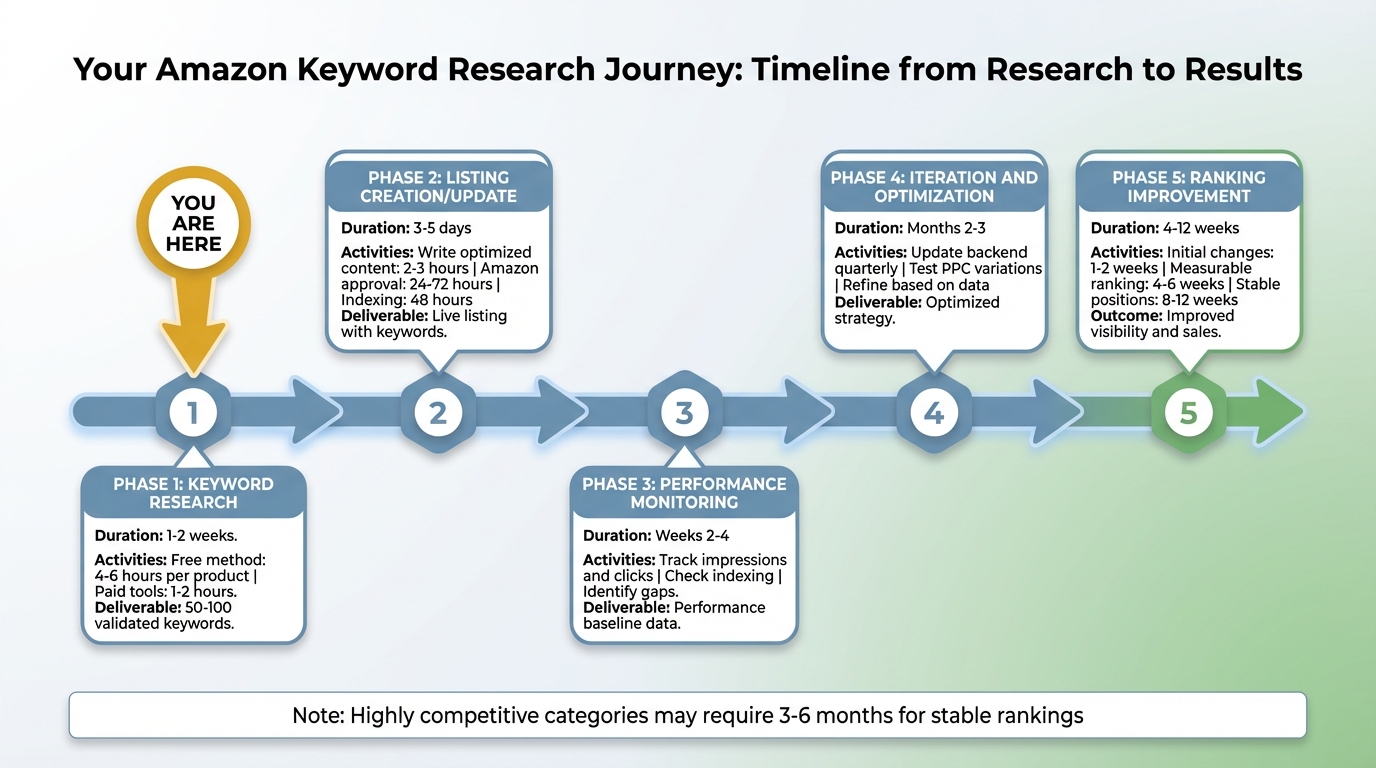
Your complete journey from keyword research to ranking results with realistic timelines
Timeline Expectations:
Keyword Research Phase: 1-2 weeks
- Free method: 4-6 hours per product
- Paid tools: 1-2 hours per product
Listing Creation or Update: 3-5 days
- Writing optimized content: 2-3 hours
- Amazon approval: 24-72 hours
- Indexing verification: 48 hours after approval
Ranking Improvement: 4-12 weeks
- Initial impression changes: 1-2 weeks
- Measurable ranking changes: 4-6 weeks
- Stable ranking positions: 8-12 weeks
These timelines assume competitive but not dominated categories. Highly competitive categories require 3-6 months.
When to Revisit Keyword Research
Quarterly Review Triggers: Every 90 days, review Search Term Report for new opportunities. Check if autocomplete suggestions have changed. Monitor competitor listing updates (new keywords emerging).
Event-Based Updates: After launching new product variation (requires new keywords). When entering new marketplace (UK, Canada, etc.). After major category or algorithm updates from Amazon. If traffic drops significantly without other explanation.
Continuous Keyword Discovery: Search Term Report reveals customer language every week. Add converting search terms to backend keywords monthly. Test new long-tail opportunities in PPC continuously.
Keyword research is ongoing. Initial research is foundation, not final state. Best sellers continuously refine keyword strategy based on performance data.
Optional Forward Reference
Once your listing is live and you have performance data (typically 30-60 days), you can begin optimization activities. Analyzing which keywords convert best. Adjusting advertising bids based on keyword performance. Using metrics like ACoS and conversion rate to refine strategy.
This is different from keyword research. Keyword research identifies what customers search (planning stage). Optimization analyzes performance and adjusts (execution stage). You need keyword research first. You can’t optimize what you haven’t built. Research comes before performance analysis.
After you have data, optimization strategies can improve your results further. Natural progression: Keyword Research (you are here) leads to Listing Creation leads to Launch leads to Performance Monitoring leads to Optimization.
Final Thoughts on Amazon Keyword Research
Amazon keyword research appears overwhelming when you start: dozens of tools, conflicting advice, technical terminology. But the core process is straightforward: identify what customers search, organize by relevance and competition, place strategically in your listing. You now have a complete methodology for executing this process.
Start with the free method even if you plan to buy tools. Manual research teaches you to recognize good keywords and understand customer language. Tools speed up this process but don’t replace strategic thinking. Most successful sellers began with Amazon autocomplete and spreadsheets, then graduated to paid tools as their business justified the investment.
Keyword optimization is not instant ranking magic. Keyword optimization positions your product to be discoverable when customers search. Ranking still depends on sales velocity, reviews, and conversion rate. Good keyword research removes invisibility barriers but doesn’t guarantee page 1 placement overnight. Set realistic timelines: 4-6 weeks to see initial changes, 8-12 weeks for measurable improvement.
Open your spreadsheet template (or download it if you haven’t), pick your first seed keyword, and spend the next 30 minutes harvesting autocomplete suggestions. That single session will generate 50-100 keyword ideas. You’re closer to launch than you think.

Seven essential takeaways for successful Amazon keyword research