How to Write Amazon Bullet Points That Sell [2026 Guide]
Table of Contents
Your conversion rate is stuck at 8% while competitors hit 20%. You’ve tried everything. Better images. Lower prices. More reviews. Nothing moves the needle.
The problem isn’t your product. It’s your bullet points.
Amazon shoppers scan your bullets in under 30 seconds. They’re not reading. They’re hunting for a reason to click “Add to Cart” or bounce to the next listing. Most sellers waste this window with generic feature dumps or keyword-stuffed nonsense that Amazon’s automated editing system now flags and rewrites.
Here’s what changed in August 2024: Amazon can now auto-edit bullet points that violate policy. Your carefully crafted copy? Gone. Replaced with generic text you didn’t approve.
This guide gives you the exact system to write high-converting Amazon bullet points that pass Amazon’s filters and actually sell your product. No fluff. No theory. Just the practical framework that works.
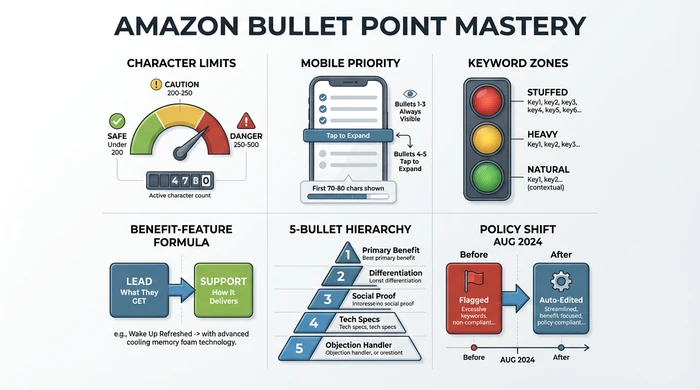
The complete Amazon bullet point optimization framework at a glance
What Makes Amazon Bullet Points Convert
High-converting bullet points do three things: they answer the buyer’s main question in 3 seconds, they prove your product solves a specific problem, and they survive mobile display where 63% of Amazon shoppers browse.
The formula is simple. Lead with what the customer gets. Support with how your product delivers it.
The Benefit-First Formula:
- Lead with the benefit - “Keeps coffee hot for 12 hours” beats “Double-wall vacuum insulation”
- Quantify the outcome - “Saves 15 minutes per load” beats “Faster drying”
- Address hidden objections - “Fits standard cup holders (3.2 inch diameter)” stops the “will it fit?” bounce
- Front-load for mobile - First 70-80 characters must hook the reader
- Match search intent - If they searched “leak-proof water bottle,” that phrase appears in bullet 1
Amazon’s character limit is 200 characters per bullet for most categories. But mobile display cuts that off around 150 characters before the “more” button appears.
Your desktop-perfect bullets might look terrible on mobile. Test by viewing your listing on your phone before publishing.
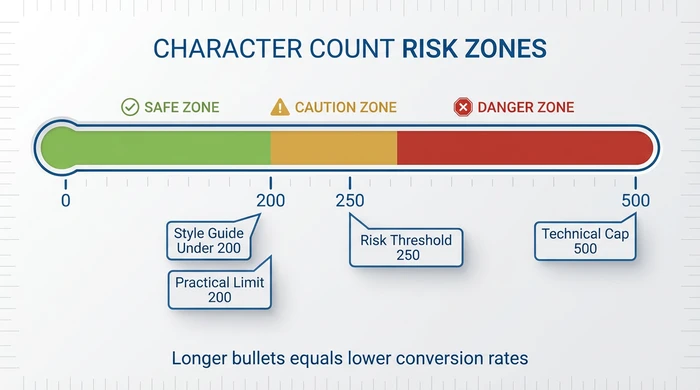
Character count risk zones: Stay under 200 for best results
The Psychology Behind High-Converting Bullets
Amazon shoppers don’t make logical decisions and then buy. They make emotional decisions and then search for logical justification. Your bullet points must satisfy both layers.
Example: Insulated Coffee Mug
- Emotional Layer: “Never miss hot coffee during your morning routine” (convenience, self-care)
- Logical Justification: “12-hour insulation keeps coffee hot from 6am breakfast to 6pm commute”
- Combined Bullet: “Never miss hot coffee during your morning routine—12-hour vacuum insulation keeps drinks hot from 6am to 6pm, no reheating needed”
The first 10 words trigger the emotion. The supporting details provide the logic customers use to justify the click.
The 5-Step Bullet Point Writing System
Writing bullet points that convert requires a systematic approach. Follow these five steps every time you create or revise your listing.
Step 1: Identify Your Top 5 Customer Questions
Before writing anything, answer this: What are the 5 questions preventing someone from clicking “Add to Cart” right now?
Pull these from your product reviews. Look for “I wish I knew…” comments. Check competitor reviews for complaints that appear 10+ times. Browse Amazon’s “Customers also asked” section.
Example for a yoga mat:
- Will it slip during hot yoga?
- Does it smell like rubber?
- Is it thick enough for bad knees?
- Can I throw it in the washer?
- Will it fit in a standard gym bag?
Each bullet answers ONE question. Not features. Questions.
Step 2: Write Benefit-First Statements
Take each question and flip it into a benefit statement with proof.
Bad: “Made with TPE material”
Good: “Non-toxic TPE material passes Prop 65 testing - safe for daily use, no chemical smell out of the box”
The pattern is [Benefit] + [Proof/Spec] + [Why it matters]. Every bullet follows this structure.
For sellers struggling to identify which benefits resonate emotionally, WhyBuyIt takes a psychology-first approach—analyzing your product category to surface the emotional motivators customers actually care about.
Step 3: Front-Load the First 10 Words
Mobile users see roughly the first 10-12 words before the “…” appears. Your first bullet must earn the tap to expand.
Mobile-killing opener: “Our premium yoga mat features state-of-the-art construction with…”
Mobile-optimized opener: “No-slip surface grips through hot yoga - textured pattern prevents sliding even when wet”
The benefit lives in the first 10 words. The proof follows.
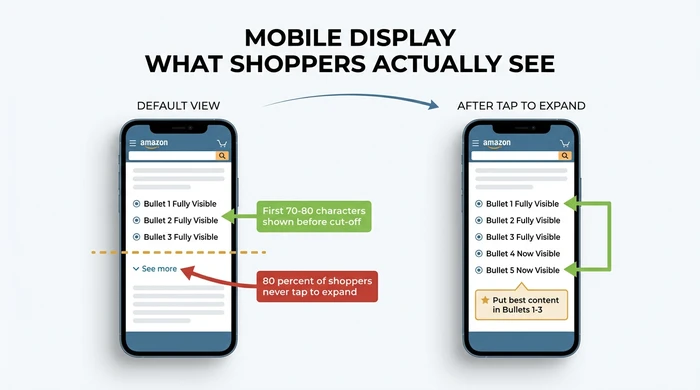
80% of shoppers never tap to expand - put your best content in bullets 1-3
Step 4: Use the Bullet Prioritization Hierarchy
Not all benefits deserve bullet space. Position determines purpose.
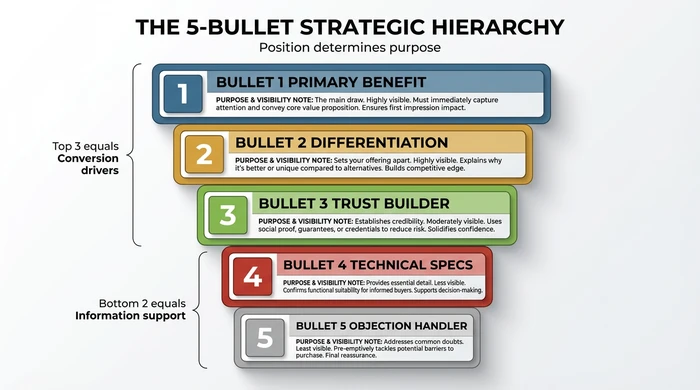
The 5-bullet strategic hierarchy: Top 3 drive conversions, bottom 2 support
- Bullet 1: Primary benefit + main keyword (always visible on mobile)
- Bullet 2: Secondary benefit + differentiation (always visible on mobile)
- Bullet 3: Trust builder - social proof, guarantee, or credibility (last always-visible bullet)
- Bullet 4: Technical specifications - dimensions, materials, compatibility (requires tap)
- Bullet 5: Objection handler - address concerns, FAQs, compatibility (lowest visibility)
Bullets 1-3 are your conversion drivers. Bullets 4-5 provide information support for detail-oriented buyers who’ve already decided you’re a contender.
Step 5: Test and Iterate
Conversion optimization never stops. Change one bullet every 30 days and track your conversion rate.
Amazon doesn’t allow A/B testing bullets directly. But you can monitor sessions-to-orders ratio before and after edits. Run Sponsored Product campaigns with different messaging to test angles. Survey buyers 7 days post-purchase: “What convinced you to buy?”
Amazon’s August 2024 Bullet Point Policy Changes
Amazon rolled out automated editing in August 2024. If your bullets violate content policy, Amazon rewrites them without warning.
What triggers auto-editing:
- Promotional language (“Best seller,” “Top rated,” “Act now”)
- Pricing references (“Only $19.99,” “Cheaper than competitors”)
- Shipping claims (“Free 2-day shipping” belongs in the offer, not bullets)
- Non-product claims (“Amazing customer service,” “30-day guarantee”)
- Emojis and special characters
What still works:
- Quantified product claims backed by specs
- Comparative statements about YOUR product (“30% larger capacity than our previous model”)
- Compatibility information
- Certifications and test results
Run your bullets through Amazon’s listing quality dashboard before publishing. Red flags appear in real-time. Fix them before Amazon’s bot does it for you.
The Bullet Point Builder Prompt Template
Use this AI prompt to generate your first draft. Copy and paste into ChatGPT or Claude.
AMAZON BULLET POINT GENERATOR

Product: [Your product name]
Category: [Amazon category]
Main Benefit 1: [What problem does it solve?]
Main Benefit 2: [What outcome does the buyer get?]
Main Benefit 3: [What makes it better than alternatives?]
Target Customer: [Who buys this?]
Key Feature 1: [Technical spec that matters]
Key Feature 2: [Technical spec that matters]
Primary Keyword: [Main search term]
Secondary Keywords: [3-5 additional terms]

Generate 5 Amazon bullet points that:
- Lead with benefits, support with features
- Stay under 200 characters each
- Include keywords naturally (no stuffing)
- Use sentence case, no ALL CAPS
- Front-load the most compelling information
This prompt gets you 80% of the way there. The final 20% is manual polish - replacing generic language with product-specific proof points.
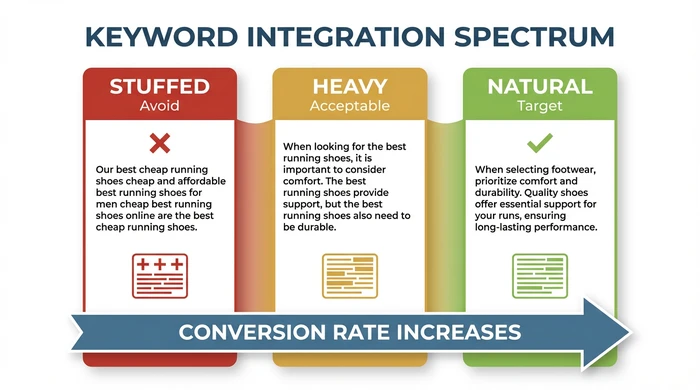
Natural keyword integration converts better than obvious stuffing
Before/After Bullet Point Transformations
Example 1: Wireless Earbuds
BEFORE (Feature-Dump Style):
- Bluetooth 5.0 technology with advanced chipset
- Premium sound quality with deep bass
- Comfortable fit for all-day wear
- Comes with charging case included
AFTER (Conversion-Focused):
- 48-hour battery life with charging case - Charge once per week, not daily
- Secure fit stays put during runs - 3 silicone tip sizes included
- Crystal-clear calls with dual microphones - Noise cancellation filters out wind
- Instant pairing with iPhone and Android - Connects in 2 seconds when you open the case
Benefits moved to the front. Proof points added. “Why it matters” context closes each bullet.
Example 2: Kitchen Knife Set
BEFORE:
- High-carbon stainless steel blades
- Ergonomic handle design
- Full tang construction
AFTER:
- Stays sharp 3x longer than standard knives - High-carbon German steel holds an edge through 200+ meals
- Balanced weight prevents hand fatigue - Full-tang design distributes weight evenly
- Includes the 8 knives you’ll actually use - Chef, paring, serrated, utility, steak knives
The transformation pattern: quantify the benefit, explain the feature, connect to real use.
Category-Specific Character Limits
Amazon’s bullet point rules vary by category. Violate them and your listing gets suppressed or auto-edited.
| Category | Character Limit | Special Rules |
|---|---|---|
| Home & Kitchen | 250 characters | Measurement claims must be verifiable |
| Clothing & Accessories | 256 characters | Size charts required for fit claims |
| Electronics | 200 characters | Compatibility lists allowed |
| Beauty & Personal Care | 200 characters | Health claims trigger FDA review |
| Toys & Games | 200 characters | Age recommendations required |
| Sports & Outdoors | 200 characters | Safety certifications must be cited |
When in doubt, stay under 200 characters. It works across all categories and ensures mobile compatibility.
Learn more about optimizing your entire Amazon listing for maximum visibility and conversions.
Variations and Edge Cases
Brand Registry differences: Non-registered sellers face stricter automated reviews. Brand Registered sellers can include light brand language, but promotional claims still get flagged.
Mobile vs Desktop: Desktop shows full bullets. Mobile truncates after 150 characters with a “more” button. Since 63% of shoppers browse mobile-first, optimize for the smaller screen.
International variations: Character limits can differ by marketplace. When selling on Amazon UK, DE, or other international sites, verify local style guide requirements.
For deeper guidance on Amazon keyword research, see our dedicated guide on finding the right terms for your listings.
FAQ
Q: What is the character limit for Amazon bullet points?
200 characters for most categories. Home & Kitchen allows 250. Clothing allows 256. Mobile display cuts off around 150 characters before the “more” button, so front-load your most important information.
Q: How many keywords should I include in each bullet point?
One to two keywords per bullet, naturally integrated. The myth of “3-5 keywords per bullet” leads to unreadable, policy-violating copy. Amazon’s algorithm prioritizes readability and conversion signals over keyword density.
Q: What words should I avoid in Amazon bullet points?
Avoid promotional language: “best,” “top-rated,” “discount,” “sale,” “limited time.” Avoid pricing references. Avoid shipping claims. Avoid non-product claims like “best customer service.” Amazon’s auto-editor flags and rewrites these.
Q: Should I use A+ Content or bullet points for descriptions?
Use both. Bullet points handle the 5 core buying reasons. A+ Content handles brand story, detailed comparisons, and visual storytelling. Bullets convert browsers to buyers. A+ builds trust and reduces returns.
Q: How do I optimize bullet points for mobile devices?
Keep bullet 1 under 150 characters so it displays fully without truncation. Lead with benefits in the first 10 words. Test by viewing your listing on a phone before publishing. If you see “…” before the key benefit, rewrite.
Conclusion
Amazon bullet points are your 30-second pitch to convert browsers into buyers. The sellers who win don’t write longer bullets. They write smarter ones.
Start with the 5 questions preventing purchase. Transform each into a benefit-first statement. Front-load for mobile. Respect the 200 character guideline. Test and iterate.
The August 2024 policy changes mean compliance matters more than ever. Write bullets that convert AND pass Amazon’s automated checks.
Your next step: Open your best-selling listing. Read your bullet points aloud. If they sound like a feature list instead of a sales pitch, rewrite them using the system in this guide. For automated help identifying the emotional triggers your customers respond to, try WhyBuyIt—it’s free and designed specifically for psychology-based bullet point optimization.
For more strategies to increase your Amazon conversion rate, explore our related guides.