What Is Amazon PPC? Pay-Per-Click Advertising Explained
Table of Contents
Introduction
Everyone keeps mentioning “PPC.” You’re researching how to sell on Amazon, and the term appears everywhere - seller forums, YouTube tutorials, consultant pitches. But no one explains what it actually is or why it matters.
Without understanding PPC, you can’t evaluate whether it’s right for your business, how much it might cost, or when to consider using it. You risk either avoiding it entirely (potentially missing sales opportunities) or jumping in blindly (potentially wasting ad budget). Every article assumes you already know the basics.
This article explains Amazon PPC from the ground up, assuming no prior advertising experience. You’ll learn exactly what Amazon PPC is, how the system works, what the three ad types do, and what key terms like “bid,” “impression,” and “ACoS” actually mean. By the end, you’ll have the vocabulary and foundational knowledge to make informed decisions about whether and when to explore PPC for your Amazon business.
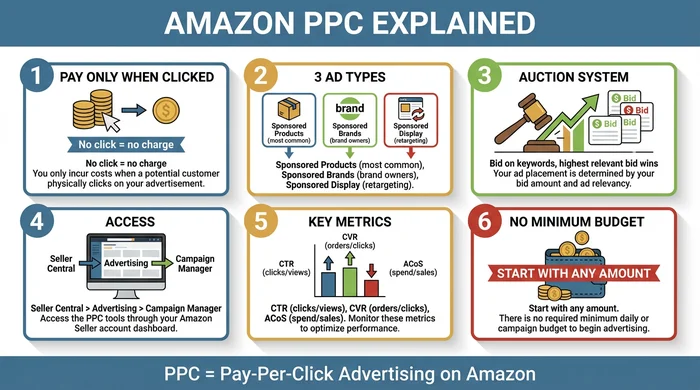
Quick visual summary of Amazon PPC fundamentals
What Is Amazon PPC?
You pay only when someone clicks. That’s PPC.
Amazon PPC stands for Pay-Per-Click, an advertising model where you pay only when someone clicks your ad, not just when they see it. Amazon PPC is the advertising platform built into Amazon that lets sellers promote their products to shoppers searching on Amazon.
Unlike billboard or television ads where you pay for exposure regardless of results, PPC charges only for engagement. Here’s how it works: You create ads for your products, set a maximum price you’ll pay per click (your “bid”), and Amazon displays your ads to relevant shoppers. When shoppers click your ad, they go directly to your product page, and you pay the click cost (which may be less than your maximum bid). If Amazon shows your ad but no one clicks, you pay nothing.
Think of Amazon PPC like a sidewalk vendor paying a marketplace only when customers stop to look at their products, rather than paying rent for the booth space regardless of traffic. This zero-cost exposure model makes PPC accessible for sellers with varying budgets.
Amazon PPC is specifically designed for the Amazon marketplace. When shoppers search for products on Amazon, your ads can appear alongside organic (non-paid) search results. The ads are labeled “Sponsored” to distinguish them from regular product listings. Because the ads appear to shoppers who are actively searching for products to buy, Amazon PPC reaches customers with high purchase intent.
For new sellers, Amazon PPC offers immediate visibility in a marketplace where millions of products compete for attention. Products without sales history or customer reviews typically appear on page 5 or beyond in search results. PPC lets you bypass that initial visibility challenge by placing your product at the top of page 1 from day one, even with zero reviews. For more comprehensive guidance on using Amazon PPC effectively, see the complete Amazon PPC guide.
How Amazon PPC Works
Amazon PPC operates through two interconnected systems: an auction mechanism determining which ads appear, and a customer journey turning ad impressions into potential sales.
The Auction System
Every search triggers an instant auction. When a shopper searches Amazon for a product, an auction occurs among advertisers who bid on relevant keywords.
You set a maximum bid (for example, $1.50) representing the most you’ll pay for one click. Amazon considers both your bid amount and your ad relevance to decide which ads win placement.
Winning ads appear in search results and product pages as “Sponsored” listings. You typically pay slightly less than your maximum bid - just enough to beat the next competitor in line. This second-price auction model means your actual cost per click (CPC) is often lower than your maximum bid.
The relevance factor protects shoppers from irrelevant ads. Even if you bid $5.00 per click, your ad for gardening gloves won’t appear when someone searches for wireless headphones. Amazon’s algorithm prioritizes showing ads matching shopper intent, which improves the shopping experience and increases the likelihood clicks convert to purchases.
The Customer Journey
Understanding the customer journey helps clarify what you pay for and when. Here’s the step-by-step flow:
- A shopper searches for a product (for example, “yoga mat”)
- Your ad appears among search results with a “Sponsored” label
- The shopper sees your ad but does NOT click: You pay $0
- The shopper clicks your ad: You pay your bid amount, and the shopper lands on your product page
- The shopper may purchase or may leave without buying (PPC only charges for the click, not the sale)
This flow reveals an important distinction: PPC guarantees you traffic (visitors to your product page), but doesn’t guarantee sales. The quality of your product listing - images, title, bullet points, description, reviews, and price - determines whether that traffic converts to purchases.
{{/* < figure src="/images/guides/amazon-ppc-auction-flow-diagram.png" alt=“How Amazon PPC Works - Complete Flow from Bid to Sale” caption=“Visual representation of the Amazon PPC auction and customer journey” width=“600px” > */}}
| Step | What Happens | Who Acts |
|---|---|---|
| 1 | Seller chooses keywords and sets a bid amount (the maximum they'll pay per click) | Seller |
| ↓ | Campaign goes live | |
| 2 | Customer searches for a product on Amazon using keywords | Customer |
| ↓ | Amazon processes the search | |
| 3 | Amazon runs an instant auction among all advertisers bidding on that keyword | Amazon |
| ↓ | Winners determined by bid and relevance | |
| 4 | Winning ads appear in search results marked "Sponsored" | Amazon |
| ↓ | Customer sees the ads | |
| 5a | Customer sees ad but does NOT click | Customer |
| → | Result: Seller pays nothing. This is the "pay-per-click" model - no click, no charge. | |
| 5b | Customer clicks on the ad | Customer |
| ↓ | Result: Seller pays the bid amount. Customer lands on the product page. | |
| 6 | Customer either purchases the product or leaves without buying | Customer |
| ↓ | Amazon records the outcome | |
| 7 | Seller reviews campaign metrics: impressions, clicks, and sales | Seller |
The key takeaway: You only pay when someone clicks your ad. Thousands can see your ad (impressions) for free, but you’re only charged when a potential customer takes action.
Types of Amazon PPC Ads
Amazon offers three distinct ad formats, each serving different purposes and available to different seller types. Understanding these differences helps you identify which ad type aligns with your current business stage.
Sponsored Products (Most Common)
Sponsored Products are ads promoting individual product listings. They appear within search results and on product detail pages of related items. All sellers with active listings can use Sponsored Products, making this the most accessible ad format.
Sponsored Products work best for driving direct sales of specific items. When a shopper searches for “stainless steel water bottle,” your Sponsored Product ad shows your water bottle listing alongside organic search results. The visual identifier is a “Sponsored” label beneath the product image.
This ad type accounts for the majority of Amazon PPC activity because it requires no special eligibility, works for any product category, and directly connects searcher intent to product listings. If you’re new to Amazon PPC, start with Sponsored Products. For beginners looking to launch their first campaign, review this Amazon PPC for beginners guide.
Sponsored Brands
Sponsored Brands feature your brand logo, custom headline, and multiple products in one ad unit. These ads appear at the top of search results as a banner-style format, displaying horizontally across the page with your logo and headline above product images.
Only brand-registered sellers can use Sponsored Brands. Amazon Brand Registry requires trademark approval, making this format unavailable to sellers without registered brands or to those selling unbranded products.
Sponsored Brands work best for building brand awareness and showcasing your product range. Instead of promoting a single item, you can feature three complementary products (for example, yoga mat, yoga blocks, and resistance bands) under one branded ad. This format helps established brands increase visibility and cross-sell related products.
Sponsored Display
Sponsored Display ads target shoppers based on their browsing behavior, appearing on product pages, in search results, and even off Amazon on external websites and apps. This retargeting capability lets you reach customers who viewed your products or similar products but didn’t purchase.
Sponsored Display has specific eligibility criteria beyond basic seller status. Amazon determines eligibility based on account history and other factors. This ad type is more advanced than Sponsored Products or Sponsored Brands.
Sponsored Display works best for re-engaging shoppers who showed interest but didn’t buy. For example, if someone viewed your camping tent but left without purchasing, Sponsored Display can show your tent ad to that shopper later while they browse other Amazon pages or partner websites.
Most beginners start with Sponsored Products before exploring Sponsored Brands or Sponsored Display. The simpler setup and universal eligibility make Sponsored Products the logical entry point for learning Amazon PPC fundamentals.
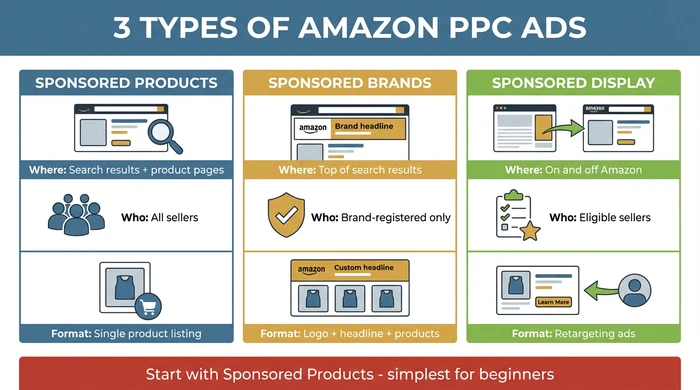
Visual comparison showing placement differences between Sponsored Products, Sponsored Brands, and Sponsored Display
What NOT to Worry About Yet
As you learn what Amazon PPC is, you may encounter advice that sounds urgent but isn't relevant to you yet. Here's what to set aside for now:
- "Start with automatic campaigns" - This is setup advice for people ready to launch. You're still learning what PPC is.
- "Aim for 30% ACoS or lower" - ACoS targets depend on your specific profit margins and goals. There's no universal benchmark applying to everyone.
- "You need negative keywords" - Important for campaign optimization, but you can't optimize what you haven't created yet.
- "Use this tool to optimize your campaigns" - Tools help manage existing campaigns. You need to understand PPC basics first.
Focus for now: Understand how PPC works, learn the vocabulary, and assess whether you're ready to start. Campaign strategy comes later.
Key Metrics You Need to Know
You’ll encounter specific metrics repeatedly in articles, forums, and Amazon’s Campaign Manager dashboard. Understanding these terms now gives you the vocabulary to participate in discussions, read campaign reports, and ask informed questions. These are definitions, not targets - you don’t need to optimize them yet.
Think of metrics as the language of PPC. Just as learning basic cooking terms (simmer, saute, braise) helps you follow recipes before you become a chef, learning PPC metrics helps you understand the platform before you run campaigns.
The Core Performance Metrics
These metrics measure what happens when your ads run:
| Metric | Full Name | Definition | Simple Example |
|---|---|---|---|
| Impressions | Ad Impressions | Number of times your ad was displayed to shoppers | Your ad appeared 1,000 times in search results |
| Clicks | Ad Clicks | Number of times shoppers clicked your ad | 50 shoppers clicked your ad out of 1,000 impressions |
| CPC | Cost Per Click | Amount you paid for each click | You spent $50 total divided by 50 clicks equals $1.00 CPC |
| CTR | Click-Through Rate | Percentage of impressions resulting in clicks | 50 clicks divided by 1,000 impressions equals 5% CTR |
| CVR | Conversion Rate | Percentage of clicks resulting in purchases | 10 orders divided by 50 clicks equals 20% CVR |
Impressions represent visibility. High impressions mean shoppers are searching for keywords related to your products. You pay nothing for impressions - they measure potential reach, not actual cost.
Clicks represent engagement. Each click costs money (your CPC) and brings a shopper to your product page. Clicks measure interest, but not yet purchase intent.
CTR (Click-Through Rate) measures how compelling your ad appears to shoppers. If 100 people see your ad and 5 click, your CTR is 5%. Higher CTR suggests your product image, title, and price are attractive relative to competing listings.
CVR (Conversion Rate) measures how well your product listing converts visitors into buyers. If 50 people click your ad and 10 purchase, your CVR is 20%. Higher CVR suggests your listing (images, description, reviews, price) convinces shoppers to buy.
CPC (Cost Per Click) measures your average cost per visitor. This varies by keyword competition and your bid amounts. A $1.00 CPC means you paid $1.00 on average for each person who clicked your ad.
For more detail on how these metrics work together in campaign analysis, see this guide on key Amazon PPC metrics.
The Business Outcome Metrics
These metrics measure financial performance and return on advertising spend:
| Metric | Full Name | Formula | What It Tells You |
|---|---|---|---|
| ACoS | Advertising Cost of Sales | (Ad Spend / Sales from Ads) x 100 | What percentage of your ad-driven sales you spent on advertising. Example: Spent $50, made $200 in sales from those ads equals 25% ACoS |
| RoAS | Return on Advertising Spend | Sales from Ads / Ad Spend | How many dollars in sales you earned for each dollar spent on ads. Example: $200 sales divided by $50 spend equals 4.0 RoAS (inverse of ACoS) |
| TACoS | Total Advertising Cost of Sales | Ad Spend / Total Sales (including organic) | Advanced metric showing ad spend as percentage of ALL sales - mentioned for awareness only |
ACoS (Advertising Cost of Sales) is the most commonly discussed PPC metric. It measures what percentage of your ad-generated sales you spent on advertising. A 25% ACoS means you spent $25 on ads for every $100 in sales those ads generated.
ACoS varies dramatically by product category, profit margins, and business goals. A supplement seller with 60% profit margins can sustain a 40% ACoS and still profit. A book seller with 20% margins can’t. There’s no universal “good” ACoS percentage - it depends entirely on your specific product economics.
RoAS (Return on Advertising Spend) is the inverse of ACoS. While ACoS shows what percentage of sales you spent (25% ACoS), RoAS shows your return multiple (4.0 RoAS means you earned $4 for every $1 spent). Some sellers prefer RoAS because it frames results as a return multiple rather than a cost percentage.
TACoS (Total Advertising Cost of Sales) measures ad spend against ALL sales, including organic (non-ad) sales. This advanced metric helps experienced sellers understand how PPC affects overall business performance. At the discovery stage, knowing TACoS exists is sufficient - you don’t need to calculate or track it yet.
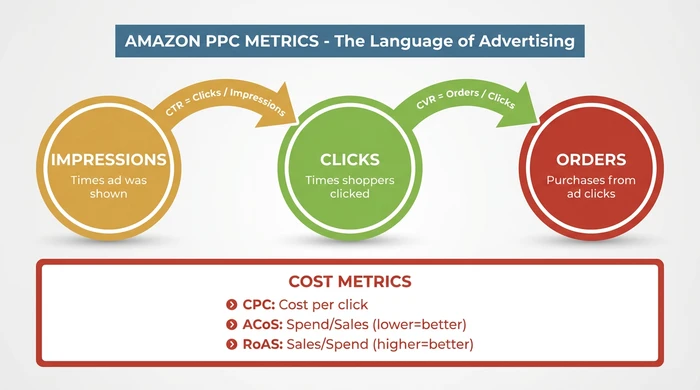
Quick reference guide for understanding core PPC metrics
These metrics appear in your Amazon Campaign Manager dashboard once you run ads. You’ll encounter these terms immediately when reading about PPC - knowing what they mean helps you understand discussions even before running campaigns.
Why Sellers Use Amazon PPC
Sellers use Amazon PPC for strategic reasons tied to the realities of selling in a crowded marketplace. Understanding these motivations helps you evaluate whether PPC aligns with your business situation.
Visibility in a Crowded Marketplace
Millions of products compete for shopper attention on Amazon. New products often have no organic ranking and appear on page 5 or beyond in search results. Few shoppers browse past page 2. PPC places your product at the top of page 1 immediately, even with zero reviews. This visibility advantage gives new products a fighting chance against established competitors with sales history.
Control Over Discoverability
Organic ranking depends on sales history, reviews, and Amazon’s algorithm - factors you can’t directly control. PPC lets you choose which keywords trigger your ad, giving you direct control over how shoppers find you. If you sell camping tents and want to appear when shoppers search “4 person tent waterproof,” you can bid on that exact phrase. Organic ranking may eventually get you there, but PPC makes it happen immediately.
Reaching Ready-to-Buy Customers
PPC ads appear when shoppers actively search for products, indicating high purchase intent. Unlike social media ads where you interrupt browsing, Amazon PPC meets shoppers who are already looking to buy. A shopper searching “stainless steel water bottle” has purchase intent. Showing your water bottle ad to that shopper is fundamentally different from showing a water bottle ad to someone scrolling Instagram. The context matters.
Supporting Organic Ranking
Sales from PPC campaigns contribute to your product’s overall sales velocity. Higher sales velocity improves organic search ranking over time, creating a compounding effect. Many sellers use PPC to “jumpstart” new products until organic ranking builds. The PPC sales generate the sales history Amazon’s algorithm uses to determine organic rankings. Over time, products with strong PPC performance often see improved organic rankings, reducing long-term dependence on advertising.
For strategic guidance on building effective campaigns, review this Amazon advertising strategy guide.
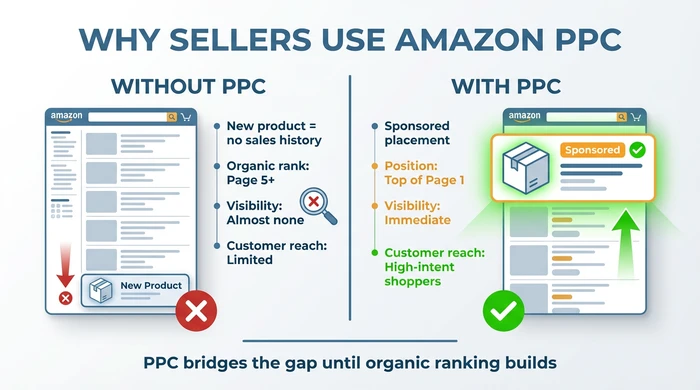
Visual representation of the primary reasons sellers invest in Amazon PPC advertising
When PPC May Not Be Necessary
PPC is a tool, not a requirement. Some situations don’t call for advertising spend:
- Products with strong organic ranking already (page 1 positions for key search terms)
- Niche products with little search competition where organic visibility is sufficient
- Products with margins too thin to absorb advertising costs while maintaining profitability
PPC works best when you need visibility organic ranking can’t provide quickly enough, and when your product margins can absorb the advertising costs while still generating acceptable profit.
What Amazon PPC Costs
Budget concerns stop many sellers from exploring PPC. Understanding the cost structure helps you assess whether PPC fits your financial situation.
No Minimum Requirement
Amazon doesn’t require a minimum budget to start PPC. You set your own daily budget (for example, $5, $10, $50 per day), and Amazon stops showing your ads once that budget is reached for the day. The next day, your budget resets. This flexibility lets sellers with small budgets test PPC without large financial commitments.
Factors That Determine Cost
Four factors influence what you actually pay for Amazon PPC:
Keyword competition: Popular search terms (for example, “wireless headphones”) have higher bids than niche terms (for example, “left-handed pruning shears”). More advertisers competing for the same keyword drives up bid prices.
Product category: Electronics and supplements typically cost more per click than books or craft supplies. Category-wide competition levels affect baseline costs.
Ad placement: Top-of-search positions cost more than product page placements. Amazon lets you adjust bids by placement type, allowing budget-conscious sellers to focus on lower-cost placements.
Your bid amount: You control your maximum cost per click. Setting a $0.50 bid means you never pay more than $0.50 per click (and often pay less). Lower bids reduce costs but may result in fewer impressions if competitors bid higher.
Typical CPC Ranges
Actual costs vary widely, but these ranges reflect common CPC levels across categories:
- Low competition niches: $0.20 - $0.60 per click
- Medium competition categories: $0.60 - $1.50 per click
- High competition categories: $1.50 - $3.00+ per click
Your specific product and keywords determine where you fall within these ranges. Niche products typically enjoy lower CPCs, while mainstream products in competitive categories face higher costs.
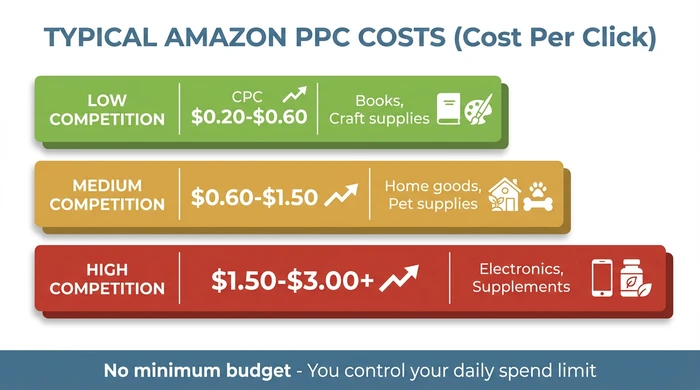
Understanding the variables that influence your Amazon PPC advertising costs
Budget Reality Check
PPC is an ongoing expense, not a one-time cost. Ads stop appearing when you pause spending. Most sellers treat PPC as a percentage of revenue, reinvesting a portion of sales back into advertising to maintain visibility. This differs from one-time marketing investments like product photography or listing optimization, which continue providing value without recurring costs.
If you have extremely thin profit margins (below 15-20%), PPC may consume your entire profit on ad-driven sales. Calculate your break-even ACoS (the percentage where ad costs equal profit) before committing to sustained PPC spending. Products with healthy margins (30%+) have more room to absorb advertising costs while maintaining profitability.
Getting Started with Amazon PPC
Once you understand what PPC is and how it works, assessing your readiness becomes the next logical step. Amazon PPC has specific prerequisites determining whether you can access the platform and whether advertising makes strategic sense for your current business stage.
Prerequisites
Before you can run Amazon PPC, you need:
- An active Amazon Seller Central account (Professional or Individual plan)
- At least one product listed and available for purchase
- Access to Campaign Manager (found in Seller Central under “Advertising” menu)
These are hard requirements. Without Seller Central access and listed products, you can’t create PPC campaigns. Amazon PPC advertises existing listings - you can’t run ads for products not yet existing on the platform.
Pre-Launch Readiness Checklist
Use this checklist to assess whether you’re ready to explore PPC campaigns. Each question addresses a factor affecting PPC success:
| Readiness Question | Why It Matters | Your Status |
|---|---|---|
| Do you have an active Amazon Seller Central account? | Required to access Amazon's advertising platform | Yes / No / Not Yet |
| Do you have products listed on Amazon? | PPC advertises existing listings - you can't run ads without a product page | Yes / No / Not Yet |
| Have you optimized your product listings (images, titles, bullet points, descriptions)? | PPC drives traffic to your listing - if the listing is poor quality, clicks won't convert to sales | Yes / No / In Progress |
| Do you have a budget for advertising (even small)? | PPC requires ongoing ad spend - decide what you can afford per day or month | Yes / No / Need to Plan |
| Are you selling products with reasonable profit margins? | Advertising costs come out of your margin - products with 15%+ margin have more room for PPC | Yes / No / Need to Calculate |
Interpretation:
- All “Yes”: You meet the prerequisites to begin exploring PPC. The next step would be learning campaign setup mechanics (choosing keywords, setting bids, selecting targeting options).
- Mix of “Yes” and “In Progress”: Focus on completing in-progress items before starting PPC, especially listing optimization. Sending traffic to poor listings wastes ad spend.
- Multiple “No” or “Not Yet”: You’re in the research phase - use this article to understand PPC, but defer actual campaigns until prerequisites are met. Focus on getting products listed and listings optimized first.
What Happens Next (If You Decide to Proceed)
Once ready, you’d access Campaign Manager in Seller Central, create your first campaign, select targeting options (automatic or manual keyword targeting), set your daily budget and bids, and launch. Those steps are implementation details beyond the scope of this foundational article.
The critical insight: Amazon PPC is accessible to sellers who meet basic prerequisites, but effectiveness depends heavily on listing quality and profit margins. Understanding what PPC is (which you now do) differs from knowing how to run successful campaigns (which requires additional learning). For guidance on setting up your first campaign when you’re ready, see this campaign setup tutorial.
Frequently Asked Questions
Do I need Amazon PPC to sell successfully on Amazon?
No. PPC is one tool for increasing visibility, not a requirement for success. Some products sell well organically through search ranking and external traffic sources. However, PPC can accelerate visibility for new products or in competitive categories where organic ranking is difficult to achieve without existing sales history. Many successful sellers use PPC strategically for product launches or seasonal promotions while relying on organic traffic for baseline sales.
How is Amazon PPC different from Google Ads?
Amazon PPC targets shoppers actively browsing Amazon with high purchase intent, while Google Ads can target users across search, display, YouTube, and partner sites. Amazon PPC ads lead directly to product pages on Amazon, creating a seamless buying experience. Google Shopping ads can direct to any website, requiring additional steps before purchase. Amazon’s auction system weighs product relevance heavily, while Google’s system focuses more on keyword match and quality score. The key difference: Amazon PPC reaches shoppers already in buying mode on a retail platform.
Can I run Amazon PPC if I’m an individual seller (not Professional)?
Yes, but with limitations. Individual sellers can run Sponsored Products ads, which represent the majority of PPC activity. Sponsored Brands require a Professional selling plan plus Amazon Brand Registry approval. Sponsored Display requires additional eligibility criteria. Most sellers exploring PPC for the first time start with Sponsored Products regardless of plan type, making the Individual plan sufficient for initial testing.
What’s the difference between PPC and organic ranking?
Organic ranking is your product’s natural position in search results based on sales history, relevance, customer reviews, and Amazon’s algorithm. It costs nothing per click but requires time to build. PPC ranking is paid placement through advertising, providing instant visibility but costing money per click. PPC sales can improve organic ranking over time by increasing sales velocity, creating a relationship between paid and organic performance. Many sellers use PPC to generate the initial sales improving organic ranking.
How much should I budget for Amazon PPC as a beginner?
Start with what you can afford to spend without expecting immediate return. Many beginners test with $10-20 per day for 2-4 weeks. The goal in the early stage is learning which keywords drive traffic and whether your listing converts clicks to sales. Budget should scale based on results once you identify what works. If $10 per day generates profitable sales, increasing to $20-30 per day makes sense. If $10 per day produces no sales, increasing budget before improving your listing or targeting strategy wastes money.
Conclusion
Amazon PPC is a pay-per-click advertising system letting sellers promote their products to shoppers actively searching on Amazon. You only pay when someone clicks your ad, giving you cost control while gaining visibility in a competitive marketplace. The three main ad types - Sponsored Products, Sponsored Brands, and Sponsored Display - serve different purposes, with Sponsored Products being the most accessible starting point for new sellers.
Understanding the key metrics (impressions, clicks, CTR, CVR, ACoS, RoAS) gives you the vocabulary to explore PPC further, even if you’re not ready to run campaigns yet. These terms appear immediately in any PPC discussion, and knowing what they mean helps you participate in conversations and evaluate advice.
Whether you ultimately use PPC depends on your product margins, competition level, and business goals. Not every seller needs PPC, especially those with strong organic rankings or niche products with limited competition. However, for sellers launching new products or competing in crowded categories, PPC provides immediate visibility organic ranking can’t deliver quickly.
If you meet the prerequisites (active Seller Central account, listed products, optimized listings, and advertising budget), PPC is accessible starting today. If not, use this knowledge to prepare for the future while focusing on the fundamentals of listing quality and product-market fit. The platform will be available when you’re ready to explore it.