Set Up Amazon Sponsored Products Without Wasting Money
Table of Contents
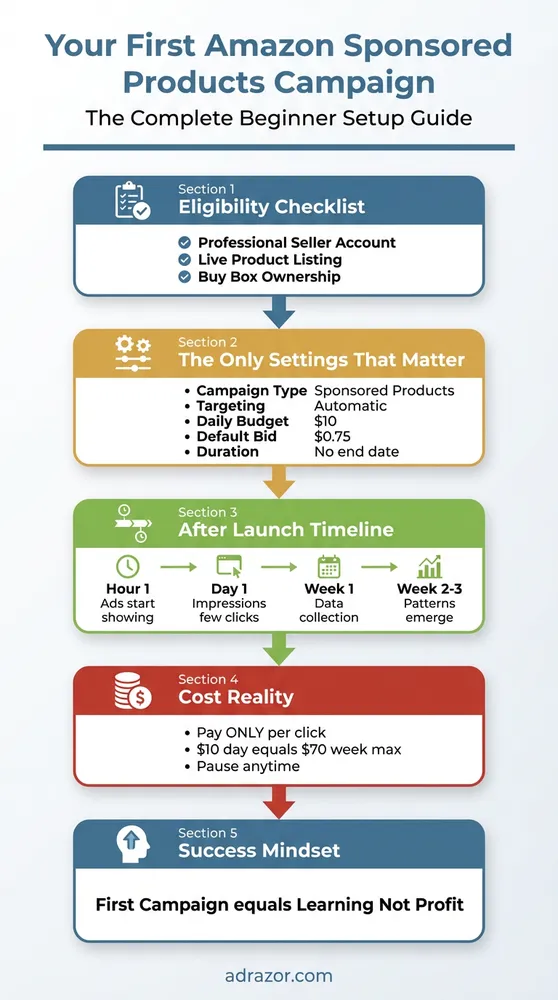
Your complete beginner setup guide for Amazon Sponsored Products campaigns
Introduction
Your product listing is live, inventory secured. But organic visibility? Nearly impossible for new products.
Competitors capture customers who should be finding your product. Manual targeting burns through budgets in hours. High bids drain dollars before you learn what converts. Your first Sponsored Products campaign requires three specific settings to protect beginners from expensive mistakes while Amazon’s algorithm identifies which customer searches match your product.
What You Need Before Creating Your First Campaign
You must have a Professional Seller account to access Amazon’s advertising platform. Professional Seller account is required for all Sponsored Products campaigns. Individual seller accounts cannot run advertising, regardless of product quality or sales history. The Professional account costs $39.99 per month and unlocks advertising tools along with other seller features.
Your product listing must be live, active, and complete with all required attributes. Draft listings cannot be advertised. Suppressed listings cannot be advertised. Products missing critical information like images or bullet points cannot be advertised. Amazon requires complete listings because ads amplify what already exists, not fix incomplete content.
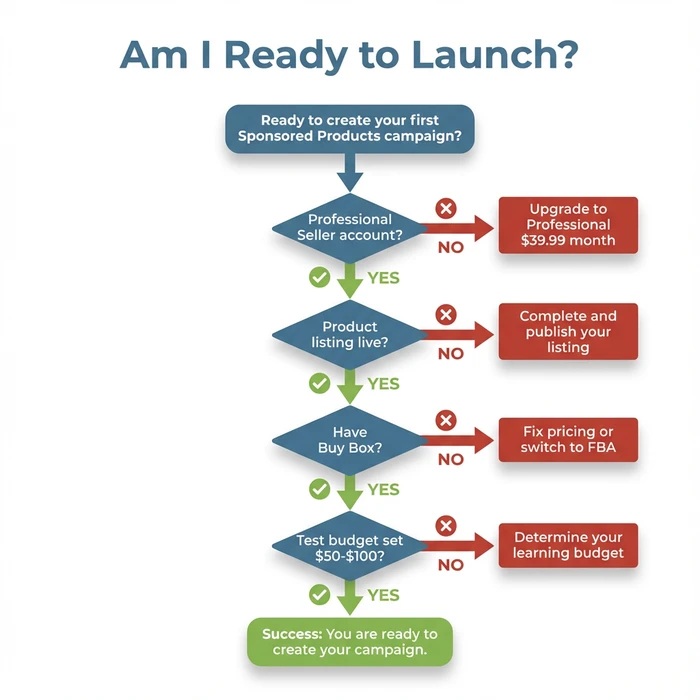
Use this decision tree to verify you are ready to launch your first campaign
Buy Box ownership is essential because Sponsored Products ads drive traffic to the Buy Box, not to your listing specifically. If you advertise a product where a competitor owns the Buy Box, you pay for clicks resulting in purchases from your competitor. Check your Buy Box percentage in Seller Central before spending on ads.
Stock availability matters because campaigns cannot run on out-of-stock products. Amazon automatically pauses campaigns when inventory reaches zero, but you still pay for any clicks occurring before the pause. Maintain sufficient inventory to fulfill orders generated by your advertising spend.
Set aside a test budget of $50-$100 you can afford to lose completely. Your first campaign is market research, not a guaranteed profit center. This budget covers 5-10 days of learning at $10 daily spend, generating enough data to make informed decisions about whether PPC works for your specific product.
Why Professional Seller Status Matters
Professional accounts receive priority access to Amazon’s advertising platform, bulk listing tools, and advanced reporting. The $39.99 monthly fee includes unlimited listings compared to the $0.99-per-sale fee structure of Individual accounts. For any seller planning to advertise, the Professional account pays for itself through the first few sales.
The Buy Box Requirement Explained
Amazon shows your ad. But if a competitor wins the Buy Box through better pricing or fulfillment method, the customer purchases from them. You paid for the click, they earned the sale. Verify Buy Box ownership before activating campaigns by checking the “Add to Cart” button on your product page while logged out of your seller account.
Inventory Threshold Considerations
Running out of stock during an active campaign wastes your previous advertising investment. Amazon’s algorithm rewards consistent availability with better ad placement. Plan for at least 30 days of inventory before launching campaigns, giving you time to collect data and reorder before stock depletes.
Understanding How Sponsored Products Work
Sponsored Products displays your listing in search results alongside organic listings and on competitor product detail pages. Your ad appears with a small “Sponsored” label, but otherwise looks identical to organic search results. Shoppers click your ad when they find it relevant to their search query.
You pay only when a shopper clicks your ad, not when Amazon displays it. This cost-per-click model means 1,000 impressions cost nothing if nobody clicks. Your daily budget controls maximum daily spend, and Amazon pauses your campaign when the budget is reached.
Amazon matches your product to customer searches using either automatic or manual targeting. Automatic targeting uses Amazon’s algorithm to analyze your product listing and show ads for relevant searches. Manual targeting requires you to select specific keywords or products where your ads appear.
Your product listing quality directly affects ad performance because the listing converts the traffic ads generate. Poor images? Weak bullet points? Unappealing pricing? Paid clicks leave without purchasing. Optimize your product listing before spending on advertising.
Where Your Ads Appear
Top of search results receives the highest-quality traffic. Shoppers see these ads immediately after searching. Rest of search shows ads interspersed with organic results throughout the search page. Product pages display your ad on competitor listings, capturing shoppers already in buying mode but considering alternatives.
The Auction System Simplified
When a shopper searches, Amazon runs an instant auction among all advertisers targeting that search term. Your bid represents the maximum you’ll pay per click, not the guaranteed amount. Amazon charges you just enough to beat the next-highest bidder, often $0.02-$0.10 less than your maximum bid.
Why Your Listing Quality Matters First
Advertising sends traffic to your listing. Your listing converts traffic into sales. A campaign with a 2% conversion rate at $1.00 CPC means you pay $50 per sale. The same campaign with a 4% conversion rate pays $25 per sale. Double your listing quality, cut your advertising cost per sale in half.
Step-by-Step: Creating Your First Campaign
Access Campaign Manager through Seller Central by clicking Advertising, then Campaign Manager. The dashboard shows existing campaigns or a “Create campaign” button for new advertisers.
Click “Create campaign” and select “Sponsored Products” from the campaign type options. Sponsored Brands and Sponsored Display require Brand Registry and additional setup complexity unsuitable for first campaigns. Sponsored Products offers the fastest path to results for new advertisers.
Name your campaign using a descriptive format including your product name and targeting type. Use “Yoga Mat - Automatic - Jan2026” instead of “Campaign 1”. This naming convention makes future campaign management easier when you run multiple campaigns across different products and targeting methods.
Skip the portfolio selection for your first campaign. Portfolios group multiple campaigns for organizational purposes, but add unnecessary complexity when learning. Amazon leaves the portfolio field blank by default, which is the correct choice for beginners.
Set your start date to today and leave the end date blank. Continuous campaigns without end dates run indefinitely until you manually pause them. End dates cause campaigns to stop unexpectedly if you forget to extend them, interrupting your advertising momentum.
Enter your daily budget in the budget field. This is the maximum Amazon will spend per day, not a guaranteed spend amount. Actual daily spend typically runs 60-80% of your set budget, especially in the first week while Amazon’s algorithm learns which placements perform best.
Navigating to Campaign Manager
The Campaign Manager lives under the Advertising tab in the main Seller Central navigation. Can’t find the Advertising tab? Verify your Professional Seller status through Settings > Account Info. Individual accounts don’t display advertising options.
Campaign Settings Screen Walkthrough
The campaign settings screen presents options in a specific order: campaign name, portfolio, dates, budget, targeting type, and bidding strategy. Amazon recommends values for some settings based on category averages, but these recommendations often exceed what beginners should spend during the learning phase.
The Portfolio Question
Portfolios appear in the campaign setup process. Clicking “Create portfolio” opens additional configuration screens distracting from your primary goal of launching your first campaign. Advanced Amazon advertising strategies use portfolios to separate brand defense campaigns from conquest campaigns, but this complexity hurts beginners more than it helps.
Setting Your Campaign Schedule
No end date means your campaign runs continuously, building data and momentum over time. Scheduled campaigns with end dates make sense for seasonal products or promotional periods, but your first learning campaign needs uninterrupted data collection over multiple weeks.
The Settings to Use
Use automatic targeting for your first campaign. Automatic targeting includes four match types Amazon controls: close match shows ads for searches closely related to your product, loose match expands to broader related searches, substitutes shows your ad on competitor product pages, and complements displays ads on products frequently purchased together.
Set your daily budget to $10 minimum. Budgets under $10 generate insufficient data. Clicks arrive too slowly to identify patterns. A $5 daily budget at $0.75 average CPC produces only 6-7 clicks per day, and 6 clicks almost never produces a conversion. Without conversions, you can’t calculate meaningful ACoS or determine if your campaign works.
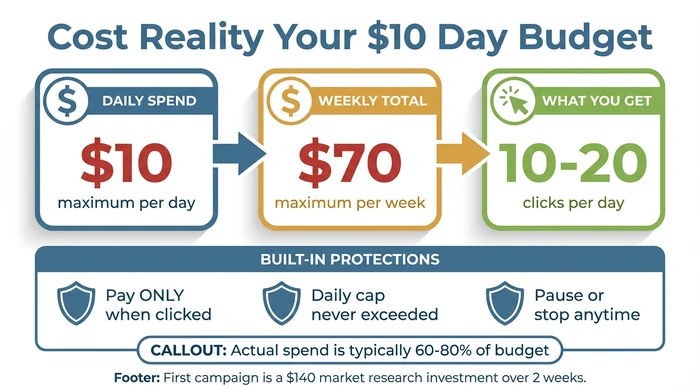
Understanding the true cost and value of your $10 daily budget
Enter $0.75 as your default bid. This covers most product categories without overpaying during the data collection phase. Amazon may suggest higher bids based on category competition, but starting at $0.75 or 60-75% of their suggested bid protects your budget while you learn. You can always increase bids after collecting data proving higher bids generate profitable sales.
Select “Dynamic bids - down only” as your bidding strategy. This conservative approach allows Amazon to lower your bids in real-time when a click is unlikely to convert, protecting your budget from wasted spend. The alternative “Dynamic bids - up and down” increases bids for high-conversion placements, but beginners lack the data to justify premium placements.
| Setting | Recommended Value | Why This Matters | Beginner Tip |
|---|---|---|---|
| Campaign Name | [Product Name] - Auto - [Date] | Easy identification when managing multiple campaigns later | Use consistent naming from day one - future you will thank present you |
| Daily Budget | $10 | Generates enough clicks (10-20 daily) for meaningful data without overspending | $10/day = $300/month maximum. Actual spend is usually 60-80% of budget |
| Targeting Type | Automatic | Amazon finds relevant keywords for you - perfect for learning what works | Automatic campaigns are your keyword research tool, not a weakness |
| Default Bid | $0.75 (or Amazon's suggested bid) | Conservative starting point - you can always increase after seeing results | If Amazon suggests $1.20, start at $0.75-$0.90. Test before committing |
| Campaign Duration | No end date | Continuous campaigns build momentum and historical data | Pause manually if needed - end dates cause campaigns to stop unexpectedly |
| Bidding Strategy | Dynamic bids - down only | Amazon lowers bids when conversion is unlikely - protects your budget | Avoid "up and down" until you have 30+ days of performance data |
Why Automatic Targeting First
Manual targeting requires you to research keywords, estimate search volume, and guess which terms convert before spending a dollar. Automatic targeting lets Amazon test dozens of search terms simultaneously, identifying winners through actual conversion data rather than guesswork. After 2-3 weeks, you harvest the best-performing search terms from your automatic campaign Search Term Report and move them to manual campaigns for precision control.
Budget Setting Logic
$10 daily spend at $0.75 average CPC generates approximately 13 clicks per day. At a typical 10% conversion rate for established products, that produces 1-2 sales daily. New products convert lower initially, but 13 clicks per day means 90+ clicks per week, enough to identify which automatic targeting segments perform.
The $0.75 Bid Sweet Spot
Category competition affects optimal bid amounts, but $0.75 represents the median starting point across most Amazon categories. Electronics and supplements may require $1.00+ bids, while home goods and kitchen products often convert at $0.50-$0.60 CPC. Starting at $0.75 positions you in the middle of most auctions without overpaying.
Bidding Strategy Explained
“Down only” means Amazon reduces your $0.75 bid to $0.50 or $0.60 when their algorithm predicts low conversion probability for a specific placement. You never pay more than $0.75, but often pay less. “Up and down” increases bids to $0.90 or $1.00 for high-conversion placements, which makes sense after you know which placements convert, but wastes budget during the learning phase.
What to Expect After Launching Your First Campaign
The first 48 hours show low impression counts. Amazon’s algorithm tests various placements. Your ad enters the auction system immediately, but Amazon rotates new campaigns through different search positions and product pages to measure performance. Expect 100-500 impressions on day one, increasing to 500-1,000+ by day three.
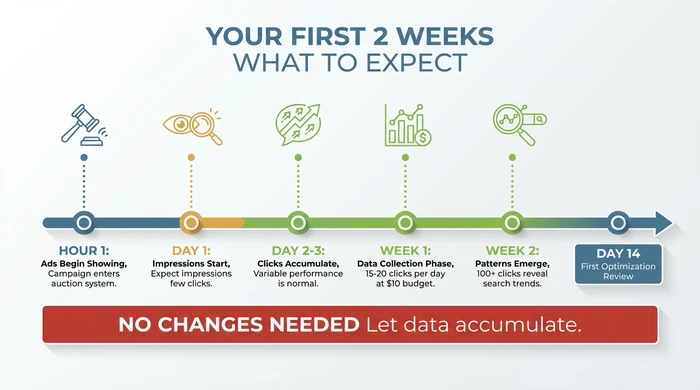
Your realistic timeline for the critical first two weeks
Week one operates as pure data collection. Your ACoS will fluctuate wildly because small sample sizes create statistical noise. One sale at $25 with $10 ad spend shows 40% ACoS, but two sales with $20 ad spend shows the same 40% ACoS. Three sales with $35 spend shows 46% ACoS. These variations are normal and meaningless until you collect 100+ clicks.
Weeks two and three reveal actual performance patterns as click volume accumulates. After 150-200 clicks, your ACoS stabilizes around its true value, search term reports show which queries generate clicks, and you can identify negative keywords wasting budget. This is when optimization decisions become possible.
Typical new seller ACoS ranges from 30-60% initially, higher than the 15-25% profitable range for established products. New products lack reviews and sales history, reducing conversion rates and increasing cost per acquisition. This is expected and temporary, not a sign PPC fails for your product.
Wait for the two-week data threshold before making changes. Adjusting bids or pausing campaigns after 3-4 days means you make decisions based on random statistical noise rather than actual performance trends. The only valid reason to intervene early is if your budget depletes within hours, indicating bids are drastically too high for your product category.
The First 72 Hours
Amazon’s algorithm tests your ads in various positions to measure click-through rate and conversion rate at different placements. Your ad might appear top of search for some searches, then switch to product pages for others, then rest of search for a third group. This testing phase requires 48-72 hours to complete.
Week One Volatility
Zero sales Monday, two sales Tuesday, one sale Wednesday, zero sales Thursday. Apparent performance swings, but this is normal click-to-conversion timing variation. Some shoppers purchase immediately, others add to cart and buy three days later. Amazon attributes the sale to the ad click, but the delay creates apparent volatility in daily reports.
The Two-Week Data Threshold
Statistical significance requires minimum sample sizes. For Amazon PPC, 100 clicks provides the minimum data to make simple decisions like identifying obviously wasteful search terms. 200+ clicks enables bid adjustments and targeting refinements with confidence. Never optimize campaigns with fewer than 100 total clicks.
Understanding Your First ACoS Numbers
ACoS measures advertising cost as a percentage of sales. If you spend $40 on ads and generate $100 in attributed sales, your ACoS is 40%. Profitable ACoS depends on your product margin, but 30-60% is normal for new products without reviews or sales history. As organic ranking improves and reviews accumulate, ACoS naturally decreases toward your target range.
Common Mistakes That Burn Money Fast
Starting with manual targeting creates keyword selection paralysis followed by expensive guessing. You research keywords using third-party tools, select 20-30 terms seeming relevant, set bids, and hope for the best. Most of your selected keywords generate zero conversions because you chose based on search volume, not conversion probability. Your budget evaporates testing your guesses instead of letting Amazon identify actual converting searches.
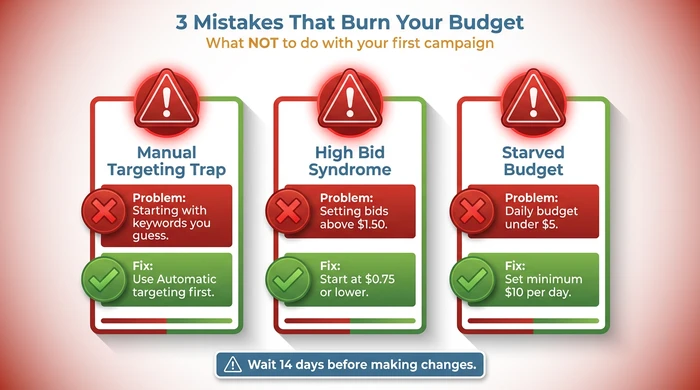
Avoid these three budget-burning mistakes in your first campaign
Setting bids above $1.50 initially triggers high bid syndrome. Aggressive bids without conversion data means you pay premium prices for clicks that may not convert. A single day can drain your weekly budget before you collect meaningful performance data. Real example: $3.00 bid multiplied by 50 clicks equals $150 spent. If your product costs $25 and you made 2 sales, your ACoS reaches 300%.
Daily budgets under $5 create data starvation. $5 daily budget at $0.75 CPC produces only 6-7 clicks per day. At a 10% conversion rate, 6-7 clicks generates 0.6-0.7 sales daily. Without conversions, you can’t calculate real ACoS or identify which search terms work. After 30 days, you’ve spent $150 but gained zero statistical confidence about whether PPC works for your product.
Pausing campaigns after 3-4 days constitutes premature optimization. Three days at $10 daily spend generates approximately 40 clicks. Unless your conversion rate exceeds 20% (far above category averages), 40 clicks rarely produces enough sales to calculate meaningful ACoS. You make decisions based on random noise, not actual performance patterns.
The Manual Targeting Trap
Beginners perceive manual targeting as “advanced” or “professional”, while automatic targeting seems like the easy beginner option. This perception is backwards. Manual targeting requires extensive keyword research skills and category knowledge only coming from running automatic campaigns first. Understanding the difference between keywords and search terms clarifies why automatic targeting finds opportunities manual selection misses.
High Bid Syndrome
Competition anxiety drives high bids. You see competitors advertising and assume you need higher bids to compete. Amazon’s auction system rewards relevance and conversion rate alongside bid amount. A highly relevant ad with a $0.75 bid often wins placements against a poorly-matched ad bidding $2.00. Start low, then increase based on data.
Budget Too Low Problem
Fear of wasted spend motivates low budgets, but insufficient data guarantees wasted spend. You spend $150 over 30 days, collect 200 clicks spread across 50+ different search terms, identify nothing actionable, and restart the process. Concentrating that same $150 into 14 days with $10 daily budgets generates actionable insights in half the time.
Premature Optimization
The temptation to “do something” after a few days of data is strong. You see a search term with 5 clicks and no sales, add it as a negative keyword, then continue adjusting daily. Each change resets the learning curve because you never let any setting run long enough to produce statistical significance. Commit to 14 days of no changes except pausing if your budget depletes too quickly.
What Comes Next
Wait for 100 clicks or 14 days minimum before making any changes to your campaign settings. The Search Term Report becomes meaningful at this threshold because you have sufficient data to identify clear performance patterns rather than random noise.
Download your Search Term Report from Campaign Manager to see which customer searches triggered your ads and generated clicks. The report shows impressions, clicks, sales, and spend for each search term. Sort by spend to identify your highest-cost terms, then check if those terms generated sales. Terms with high spend and zero sales become negative keyword candidates.
Add negative keywords to block search terms wasting budget without converting. Negative keywords prevent your ads from showing for specific searches, reducing wasted spend on irrelevant traffic. Add negatives one at a time based on clear data showing zero conversions after 10+ clicks.
Review your automatic targeting segments to identify which of the four match types performs best. Amazon reports performance separately for close match, loose match, substitutes, and complements. Increase bids on segments with sales and acceptable ACoS, decrease bids on segments with high spend but low sales.
Consider manual campaigns only after validating automatic targeting generates profitable sales. Manual campaigns work best when you harvest proven converting search terms from your automatic campaign Search Term Report and target them with exact or phrase match keywords. This data-driven approach to manual targeting avoids the guessing game destroying beginner budgets.
The 100-Click Rule
Below 100 clicks, sample size errors dominate results. One extra sale or one fewer sale swings ACoS by 20-30 percentage points. Above 100 clicks, individual sales have smaller impact on overall metrics, and performance stabilizes near true values. Simple statistical rule: never optimize based on fewer than 100 clicks unless burns money so fast waiting would exceed your total budget.
Your First Search Term Report
The Search Term Report lives under Campaign Manager > Select Campaign > Search Term Report. Download as CSV for easier analysis in Excel or Google Sheets. Sort by “Spend” column descending to identify your most expensive search terms. Cross-reference spend against “Orders” column to find high-spend zero-conversion terms.
When to Add Negatives
Add negative keywords when a search term accumulates 10+ clicks with zero sales and the term is clearly irrelevant to your product. Example: advertising a yoga mat and receiving clicks for “yoga mat cleaner” means the searcher wants cleaning products, not mats. Add “cleaner” as negative keyword. Avoid adding negatives too early because some relevant terms take 15-20 clicks before the first conversion.
The Manual Campaign Transition Point
Launch manual campaigns after your automatic campaign proves profitability and you have 3-4 weeks of Search Term Report data. Identify your top 10-15 converting search terms from the automatic campaign report. Create a manual campaign with exact match keywords targeting those proven terms, using bid amounts based on observed cost-per-click in your automatic campaign data.
Variations and Exceptions
High-competition categories like supplements, electronics, or pet supplies may require $15-20 daily budgets because average CPC exceeds $1.00-$1.50. The same $10 budget generating 13 clicks in home goods produces only 6-7 clicks in supplements. Check category average CPC in your automatic campaign after the first few days, then adjust budget to maintain 10-15 clicks daily minimum.
Very low-price products under $10 need different bid strategies because conversion rate thresholds change. A $5 product can’t sustain $0.75 CPC unless conversion rate exceeds 15%, which is rare. Start bids at $0.50 or lower for products under $10, targeting maximum $0.40-$0.50 CPC to maintain profitable ACoS.
Brand Registered sellers access additional targeting options including Product Attribute Targeting and audience segments. Brand Registry enables Sponsored Brands campaigns and enhanced automatic targeting segments. New sellers should still start with basic Sponsored Products automatic campaigns before exploring these advanced options.
Seasonal products require different launch timing considerations. Starting a winter product campaign in October means your learning phase completes before peak season in December. Summer products need campaign launches in March-April. Factor in the 2-3 week learning curve when timing seasonal campaign launches to ensure data collection completes before peak sales periods.
High-Competition Category Adjustments
Electronics, beauty, and pet supplies often show average CPC above $1.50 in automatic campaigns. If your first week reveals CPC consistently above $1.00, recalculate your daily budget to maintain 10+ clicks daily. Budget = (desired daily clicks) x (observed average CPC). For $1.50 CPC, a $15 daily budget maintains 10 clicks per day.
Low-Price Product Considerations
Products under $15 require aggressive conversion rates to sustain typical CPC amounts. Calculate your break-even ACoS before launching campaigns. If your product costs $8 with a $3 margin (37.5% margin), your maximum sustainable ACoS is 37.5%. At $0.75 CPC, you need 5% conversion rate minimum to stay profitable.
International Marketplace Variations
Amazon UK shows typical daily budgets around 5-8 GBP for learning campaigns. Amazon Germany requires higher budgets for categories with strong local brand competition. Amazon Japan has different bidding dynamics due to mobile-first shopping behavior. Research marketplace-specific advertising guides before launching international campaigns.
Frequently Asked Questions
What is the minimum daily budget for Amazon Sponsored Products?
The technical minimum is $1 per day, but campaigns need at least $10 daily to generate meaningful data. Budgets under $10 typically exhaust before collecting enough clicks to identify performance patterns, leaving you with inconclusive results after weeks of spending.
What is the difference between automatic and manual targeting?
Automatic targeting lets Amazon’s algorithm match your product to relevant customer searches based on your listing content. Manual targeting requires you to select specific keywords or competitor products where your ads appear. Beginners should start with automatic to discover which searches actually convert before moving to manual campaigns.
How much does it cost to run Amazon Sponsored Products ads?
You pay per click, not per impression. Average cost-per-click ranges from $0.30 to $2.00 depending on category competition. A $10 daily budget typically generates 5-30 clicks per day for most product categories, with actual spend usually reaching 60-80% of your set daily budget.
Can individual seller accounts run Sponsored Products?
No. Sponsored Products campaigns require a Professional Seller account ($39.99 per month). Individual seller accounts ($0.99 per sale) can’t access Amazon’s advertising platform regardless of sales volume or product quality.
What is a good starting bid for my first campaign?
Start with $0.75 as your default bid for most product categories. This covers typical competition levels without overpaying during the data collection phase. Adjust your bid after collecting 100+ clicks and reviewing which searches convert. If Amazon suggests $1.20, start at $0.75-$0.90 and test performance before committing to higher amounts.
Conclusion
Your first Sponsored Products campaign requires three critical settings protecting beginners from expensive mistakes: automatic targeting to let Amazon find converting searches, $10 daily budget to generate meaningful data, and $0.75 default bid to avoid overpaying during the learning phase. These settings work together to produce actionable insights within 2-3 weeks while controlling risk.
The two-week learning curve is unavoidable. Amazon’s algorithm needs time to test placements, your product needs exposure to accumulate clicks, and you need conversion data to make optimization decisions. Beginners trying to shortcut this timeline through high bids or manual targeting waste budget testing their own guesses instead of learning what actually works.
After proving profitability with your first automatic campaign, explore advanced strategies in the Amazon PPC Advertiser’s Bible including manual campaigns, bid optimization, and targeting refinements. Create your first campaign today using these exact settings, then commit to waiting 14 days before making changes. The data you collect during those first two weeks determines whether PPC becomes a profitable growth channel or an expensive experiment.