How to Reduce ACoS Without Killing Sales
Table of Contents
Introduction: The “Bleeding Neck” Reality
You just audited your PPC dashboard and the numbers are red. Your ACoS is climbing well above your profit margin, meaning you are technically paying Amazon for the privilege of shipping your inventory. You feel trapped: if you slash bids aggressively, your organic rank tanks and sales disappear; if you do nothing, you bleed cash daily.
Most advice tells you to “lower bids” or “add negative keywords” immediately. This is dangerous advice that often destroys sales volume by severing the arteries of your account. To reduce ACoS effectively, you must stop hacking at your campaigns and start operating with surgical precision. This guide uses a forensic approach to eliminate waste without killing the sales velocity required to rank.
Step 1: Establish Your Mathematical Floor (Break-Even ACoS)
You cannot optimize what you cannot measure relative to profit. A 30% ACoS is excellent for a product with a 40% margin, but it is disastrous for a product with a 15% margin. Before touching a single bid, you must calculate your “Do Not Exceed” limit.
Break-Even ACoS = Profit Margin %
(Product Price - COGS - FBA Fees) ÷ Product Price = Break-Even %
Example: If your product sells for $30, and your costs (COGS + Fees) are $20, your profit is $10. $10 ÷ $30 = 33%. Your Break-Even ACoS is 33%. Any campaign running above this number is a direct loss.
Break-Even ACoS Calculator
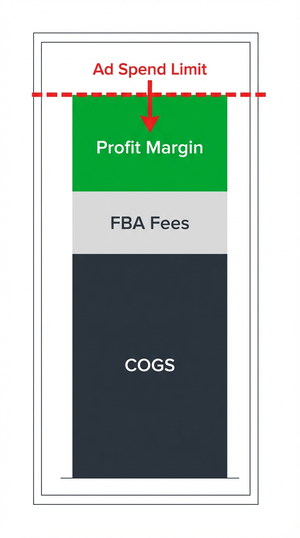
Knowing this number tells you exactly how far you can push before losing money. For a deeper dive into balancing ad spend with total revenue, review our ACoS vs. TACoS guide.
Step 2: The “Non-Converting Spend” Audit
The fastest way to reduce ACoS is to eliminate the “silent killers”—search terms that spend small amounts individually but accumulate into thousands in wasted spend. These are terms where customers click but never buy.
The Protocol:
- Download your Search Term Report (do not use the Keyword Report; you need to see what the customer actually typed).
- Filter for Spend > $0 and Orders = 0.
- Sort by Clicks (High to Low).
- Identify terms with 15+ Clicks and 0 Sales.
These terms are burning budget that could be used for converting keywords. However, before you negate them, you must understand the difference between keywords and search terms, and apply the “Iceberg” check below.
Step 3: The “Iceberg” Trap (Why Negative Keywords Can Kill Sales)
This is the most common mistake in Amazon PPC. You see a “bad” search term and your instinct is to add it as a “Negative Exact” match immediately. Do not do this yet.
Amazon uses “String Normalization” for ad targeting. This means Amazon treats singulars, plurals, and misspellings as the same data point. They also ignore “stop words” like of, for, the, and by.
The “Iceberg” Visual Logic: The high ACoS term you see is just the tip of the iceberg. Below the surface, that same keyword might be triggering profitable variations.
| The Scenario (What You See) | The "Iceberg" Reality (What Amazon Sees) | The Standard Mistake | The Surgical Solution |
|---|---|---|---|
| High ACoS on "Running Shoe" You see a singular term with 70% ACoS. | Consolidated Data Amazon links this to "Running Shoes" (Plural) which might have 15% ACoS. | Negative Exact Match You block "Running Shoe." Amazon inadvertently blocks the profitable plural "Running Shoes" too. | Bid Management Do not negate. Lower the bid on the keyword to blend the ACoS of both variations. |
| High ACoS on "Pot for Plant" You see a term with a "stop word" (for). | Normalization Amazon ignores "for." It treats "Pot for Plant" and "Plant Pot" as the exact same data point. | Negative Exact Match You try to block the specific phrase, cutting off all traffic for the core keyword. | Check Search Query Report Verify if the root keywords are profitable. If yes, lower bid. If no, negate. |
| High Spend, 0 Sales on "Nike" Your product is Adidas. | Irrelevant Traffic This is not a variation; it is a mismatch in intent. | Bid Lowering Lowering the bid just makes you bleed money more slowly. | Negative Exact Match This is the only time you should immediately negate. Cut the waste. |
For a detailed walkthrough on safe negation, read our guide on Amazon PPC Negative Keywords.
Step 4: Intelligent Bid Management & “Down Only” Strategy
Once you have verified that a keyword is relevant (passing the Iceberg check) but still has a high ACoS, you must manage the bid, not the keyword. The most effective way to control costs without losing impressions is to switch your campaign bidding strategy.
The Strategy: Ensure your manual campaigns are set to Dynamic Bids - Down Only.
- Up and Down: Amazon can raise your bid by 100% if it thinks a sale is likely. For a margin-squeezed seller, this volatility is dangerous.
- Down Only: Amazon will lower your bid when a conversion is unlikely, but will never exceed your limit. This protects your Break-Even floor.
The “Trim” Technique: Do not slash bids by 50% in one day. Reduce bids on high-ACoS keywords by 10-15% weekly. This allows you to find the “sweet spot” where ACoS aligns with your Break-Even point without losing all impression share. For more on this, see our Amazon Advertising Bidding Strategies.
Step 5: The “Fix or Fire” Protocol (Listing Optimization)
High ACoS is often a symptom of a Conversion Rate (CVR) problem, not a traffic problem. If you are bidding on “Leather Wallet” and getting clicks, but no sales, the market is telling you that your offer is not compelling compared to the competition.
The Diagnosis: Before you lower the bid (and admit defeat), audit the listing. Amazon penalizes low-converting listings with higher Cost Per Click (CPC), creating a death spiral for your ACoS.
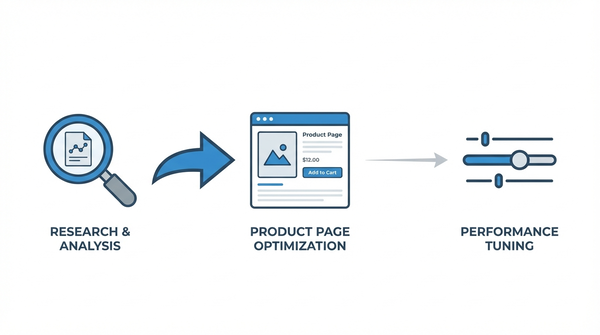
Action Steps:
- Check the Image: Is your main image better than the top 3 competitors?
- Check the Price: Are you significantly more expensive without clear justification?
- Check the Reviews: Do you have recent negative reviews on the first page?
- Check the Bullet Points: Are your bullet points persuasive? They need to be your little conversion machines.
If you improve these elements, your CVR will rise, and your ACoS will drop automatically. If you cannot fix the listing, then you must lower the bid or pause the keyword. Learn how to increase conversion rates to support your ads.
Nuance & Exceptions (When High ACoS is Okay)
Not all high ACoS is bad. There are specific lifecycle stages where you should ignore the Break-Even rule.
- The Launch Phase: New products have no history. You must pay a “tuition fee” in high ACoS to buy the data and organic rank required for long-term success.
- The “Total ACoS” (TACoS) Reality: Sometimes, a high ACoS on a specific keyword drives organic rank, which lowers your Total ACoS. If your ACoS is 50% but your TACoS is a healthy 10%, your ads are successfully fueling organic growth.
Understand the benchmarks for your category by reading What is a good ACoS on Amazon?.
Advanced Tactics: Placement Modifiers & Dayparting
If your ACoS remains stubborn, look at where and when your ads are showing.
Placement Optimization: Check your Placement Report. Often, “Top of Search” has a higher CPC but a much higher conversion rate, resulting in a lower ACoS than “Product Pages.” You can lower your base bid and add a percentage modifier (e.g., +20%) to Top of Search to funnel money toward the most efficient placement.
Dayparting: If you sell B2B products, you might be wasting spend at 2 AM. Use Amazon Ad Scheduling to pause ads during historically low-conversion hours, instantly cutting wasted spend.
Conclusion: Moving from ACoS to TACoP
Reducing ACoS is about cutting fat, not muscle. By using the “Iceberg” check before negating terms and prioritizing listing health over bid cutting, you protect your sales velocity.
For a deeper understanding of profitability beyond the basic metrics, read Why ACoS Isn’t Everything.
Reduce ACoS Faster With AdRazor
Stop guessing which changes will lower your ACoS. AdRazor gives you clear, actionable insights:
- Identify waste instantly - Red-flagged search terms show you exactly where to cut spend
- Find optimization opportunities - See which profitable terms deserve more budget
- Track improvement over time - Historical data shows the impact of your changes
- True performance data - Consolidated search terms reveal accurate conversion rates