Amazon PPC for Beginners: Stop Wasting Budget Today
Table of Contents
What Is Amazon PPC?
Amazon PPC (Pay-Per-Click) is Amazon’s advertising system where sellers pay only when a shopper clicks their ad.
You set a maximum bid for keywords. Amazon runs an auction against other advertisers. When your ad wins and someone clicks, you pay.
In 2025, Amazon attracts over 2.7 billion monthly visits. 66% of US shoppers start their product searches directly on Amazon, bypassing Google entirely. With fewer organic spots on page one and more competition than ever, paid advertising is essential for visibility.
The compounding benefit: PPC sales directly improve your organic search ranking. Products without sales history struggle to rank organically. PPC creates the sales velocity that tells Amazon your product deserves visibility. Developing a solid advertising strategy from the start will help you maximize this compounding effect.
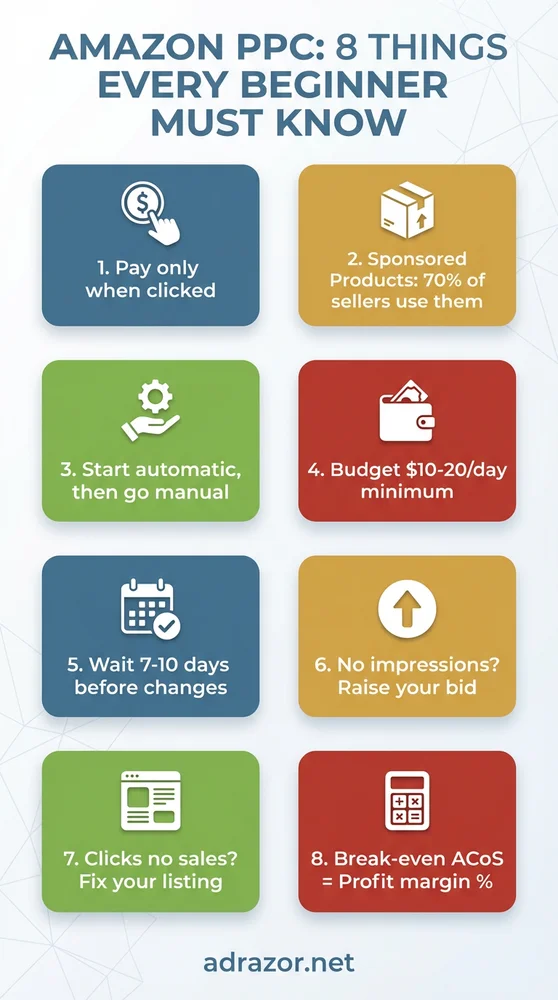
Infographic showing 8 essential Amazon PPC tips for beginners including starting with Sponsored Products, budgeting $10-20 per day, waiting 7-10 days before optimizing, and understanding that break-even ACoS equals profit margin percentage
The Three Types of Amazon PPC Ads
Amazon offers three ad formats. Each serves a different purpose. For beginners, one clearly stands out.
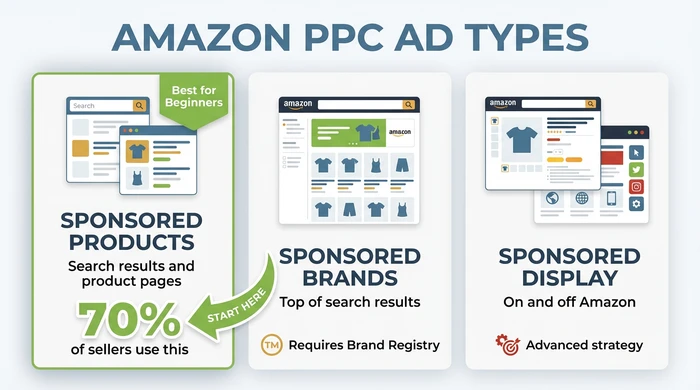
Comparison diagram of three Amazon PPC ad types: Sponsored Products (best for beginners, used by 70% of sellers), Sponsored Brands (requires Brand Registry), and Sponsored Display (advanced strategy), with arrow indicating beginners should start with Sponsored Products
Sponsored Products (Start Here)
Sponsored Products are ads for individual product listings that appear in search results and on product pages.
This is the most common Amazon ad type. 70% of third-party sellers use Sponsored Products. They look like regular listings with a small “Sponsored” tag, making them easy to trust and more likely to earn clicks.
Requirements are minimal: an active seller account with a Professional plan and a product in the Buy Box.
Sponsored Brands
Sponsored Brands feature your brand logo, a custom headline, and multiple products at the top of search results.
The catch: you need Brand Registry enrollment, which requires a registered trademark.
These ads build brand awareness. Consider them after you’ve mastered Sponsored Products.
Sponsored Display
Sponsored Display ads reach shoppers on and off Amazon based on their browsing behavior.
They’re powerful for retargeting - showing ads to people who viewed your product but didn’t buy. This is more advanced territory. Save it until you understand the fundamentals.
Essential Metrics You Need to Know
Before launching campaigns, understand these four metrics. They determine whether you’re making money or losing it.
The Core Four Metrics
| Metric | Full Name | What It Means |
|---|---|---|
| CPC | Cost Per Click | What you pay for each ad click |
| CTR | Click Through Rate | Percentage of impressions that get clicked |
| CVR | Conversion Rate | Percentage of clicks that become sales |
| ACoS | Advertising Cost of Sales | (Ad Spend / Ad Sales) x 100 |
CTR (Click Through Rate) tells you if your ad catches attention. CVR (Conversion Rate) tells you if your listing converts visitors. Both matter, but CVR affects profitability more directly. As you grow, you will need to track additional metrics like TACoS, TACoP, and Total Profit – our guide to key Amazon PPC metrics explains which metrics drive real profitability and how to avoid the common traps.
Understanding ACoS
ACoS (Advertising Cost of Sales) is the percentage of ad revenue spent on ads.
ACoS = (Ad Spend / Ad Sales) x 100
Example: Spend $20, generate $100 in sales ACoS = ($20 / $100) x 100 = 20%
Lower ACoS sounds better. But here’s what most guides won’t tell you.
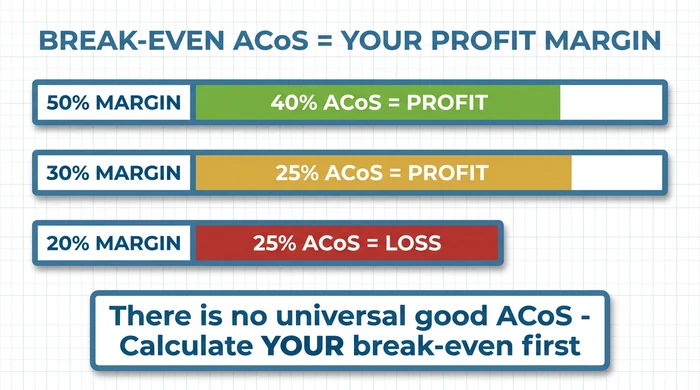
Diagram explaining break-even ACoS concept showing that a 40% ACoS is profitable with 50% margin, 25% ACoS is profitable with 30% margin, but 25% ACoS loses money with only 20% margin, emphasizing there is no universal good ACoS
Break-Even ACoS = Profit Margin %
Example:
- Product sells for $30
- Amazon fees + product cost = $18
- Profit before ads = $12
- Profit Margin = $12 / $30 = 40%
- Break-Even ACoS = 40%
Any ACoS below 40% = profit. Above 40% = loss.
A 40% ACoS that generates consistent profit beats a 15% ACoS that produces one sale per week. Focus on total profit, not percentages.
For a deeper understanding of this concept, see our guide on why ACoS isn’t everything.
Automatic vs Manual Targeting
One of the most common questions beginners ask: should I use automatic or manual targeting?
The answer is straightforward. Start with automatic. Graduate to manual.
Automatic Targeting
Automatic targeting lets Amazon’s algorithm decide when to show your ads based on your product listing information.
Pros:
- No keyword research required
- Discovers keywords you’d never think of
- Faster setup
- Reveals what actually converts
Cons:
- Less control over where budget goes
- May show for irrelevant searches
Manual Targeting
Manual targeting puts you in control. You choose specific keywords or products to target.
Pros:
- Full control over targeting
- Can focus budget on proven winners
- More precise bid management
Cons:
- Requires keyword research
- Misses opportunities you don’t know about
The Recommended Flow
Here’s the process successful sellers use:
- Week 1-4: Launch automatic campaign, let it run
- Week 2-3: Review search term report in Seller Central
- Week 3-4: Identify search terms generating sales
- Week 4+: Create manual campaign targeting proven winners
- Ongoing: Add non-converting terms as negative keywords
This approach uses Amazon’s data to inform your manual strategy. You’re not guessing which keywords matter - you have proof.
For more on understanding keywords vs search terms, the distinction is critical for optimization.
Understanding Match Types
Match types control how loosely or strictly Amazon matches your keywords to customer searches. Get this wrong and you’ll waste money or miss opportunities.
The Three Match Types
- Broad Match: Your ad shows for searches containing all your keywords in any order, plus variations and related terms
- Phrase Match: Your ad shows for searches containing your exact phrase, with additional words before or after
- Exact Match: Your ad shows for searches closely matching your keyword
Most beginners assume “exact” means exactly what they typed. It doesn’t.
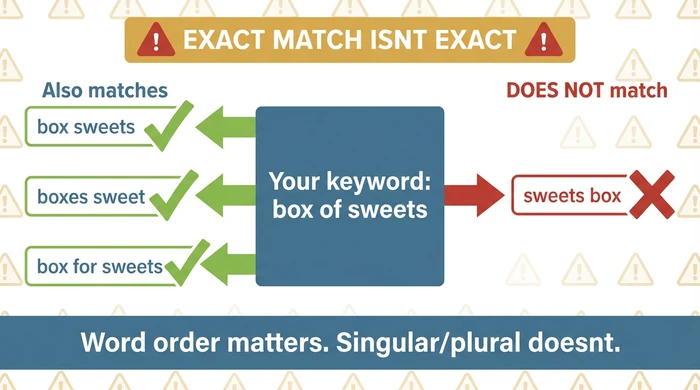
Diagram explaining Amazon exact match behavior showing that the keyword box of sweets also matches box sweets, boxes sweet, and box for sweets, but does NOT match sweets box, illustrating that word order matters but singular plural does not
Understanding how Amazon actually interprets your keywords is essential for avoiding expensive mistakes. Tools like AdRazor can help reveal exactly how Amazon is matching your keywords to search terms, showing the singular/plural and stop word variations you might miss in manual analysis.
For a deeper dive into Amazon match types and how to avoid expensive mistakes, this becomes increasingly important as you scale.
How to Set Up Your First Campaign
Ready to launch? Here’s the step-by-step process.
Before You Start: Pre-Launch Checklist
- Product listing is complete (title, bullets, images)
- Product has competitive pricing
- Professional seller account is active
- Product is Buy Box eligible
Reviews help but aren’t required. A strong listing can convert without reviews. A weak listing won’t convert even with them.
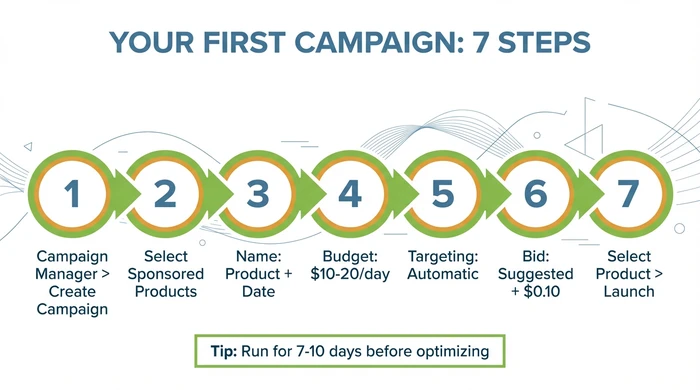
Step-by-step process flow showing 7 steps to set up first Amazon PPC campaign: access Campaign Manager, select Sponsored Products, name campaign with product and date, set $10-20 daily budget, choose automatic targeting, set bid at suggested plus $0.10, select product and launch, with tip to run 7-10 days before optimizing
Step-by-Step Setup
- Navigate to Campaign Manager in Seller Central
- Click “Create Campaign” and select Sponsored Products
- Name your campaign descriptively (e.g., “Blue Widget - Auto - Dec2025”)
- Set daily budget at $10-20 for testing
- Choose Automatic targeting for your first campaign
- Set default bid at the suggested bid plus $0.10-0.20
- Select your product and launch
Recommended First Campaign Settings
| Setting | Recommendation | Reasoning |
|---|---|---|
| Targeting | Automatic | Gather data without keyword research |
| Daily Budget | $10-20 | Enough for meaningful data |
| Default Bid | Suggested + $0.10-0.20 | Ensures you get impressions |
| Campaign Duration | No end date | Run continuously until you optimize |
Don’t set an end date. You want continuous data, not a campaign that stops when you forget about it.
For detailed setup guidance, see our guide on how to set up your first Amazon Sponsored Products campaign.
Troubleshooting: When Things Aren’t Working
Something’s not performing. Before changing everything, diagnose the actual problem.
The PPC Funnel Diagnosis
PPC works as a funnel. Problems at each stage have different causes and fixes.
| Funnel Stage | Metric | What Affects It | Where to Fix |
|---|---|---|---|
| 1. Visibility | Impressions | Bid amount, budget, keyword relevance | Campaign settings |
| 2. Interest | Click Through Rate (CTR) | Main image, title, price, reviews | Product listing (visible in search) |
| 3. Conversion | Conversion Rate (CVR) | Bullets, images, A+, price, reviews | Product listing (full page) |
| 4. Profitability | ACoS vs Margin | CPC, CVR, product margin | Bids + listing quality |
Problem-Specific Fixes
Amazon PPC Troubleshooting Guide
- Raise your bid by 50-100%
- Increase daily budget
- Check keyword relevance to your product
- Ensure product is Buy Box eligible
- Improve main image quality
- Optimize first 60 characters of title
- Check price vs competitors
- Review your star rating and review count
- Verify keyword relevance
- The problem is your listing, not your ads
- Improve bullet points with benefits
- Add more/better product images
- Check A+ Content quality
- Review pricing strategy
- Address negative reviews
- First: Calculate your break-even ACoS (= profit margin %)
- If truly above break-even: Lower bids by 10-20%
- Review search term report for irrelevant terms
- Add poor performers as negative keywords
- Wait another 7 days, then reassess
For more on improving conversions, see why conversion rate is so important for Amazon PPC and how to write high converting Amazon bullet points.
Common Mistakes and Next Steps
Learn from others’ expensive lessons, then understand what comes after the basics.
Mistakes to Avoid
Mistake #1: Changing Campaigns Too Often
The error: Adjusting bids and keywords every day or two based on small data samples.
Why it’s wrong: Amazon’s algorithm needs 7-10 days of data to learn. Constant changes prevent learning.
Mistake #2: Obsessing Over ACoS
The error: Cutting all keywords with ACoS above 25% regardless of profit margin.
Why it’s wrong: “Good” ACoS depends entirely on your margin. A 35% ACoS is excellent with 50% margins.
Mistake #3: Ignoring the Listing
The error: Blaming poor sales on PPC strategy when the listing isn’t converting.
Why it’s wrong: The best ads can’t sell a weak listing. If your page doesn’t convert, more traffic just means more wasted clicks.
Mistake #4: Misunderstanding Match Types
The error: Assuming exact match means exactly what you typed, then aggressively adding negative keywords.
Why it’s wrong: Amazon treats singular/plural as identical. Negative exact “cheap shoes” also blocks “cheap shoe.”
For more on pitfalls, see common Amazon PPC mistakes.
Your Next Steps
After 2-4 weeks of data:
- Download search term report from Campaign Manager
- Identify search terms generating sales
- Add non-converters as negative keywords
- Create manual campaign targeting proven winners
As you get comfortable:
- Test Sponsored Brands (if Brand Registered)
- Experiment with bid adjustments by placement
- Consider product targeting campaigns
Advanced optimization (future reading):
- Understanding TACoS (Total ACoS including organic sales)
- Profit-based optimization vs ACoS-based
- How to optimize Amazon PPC
The fundamentals in this guide create the foundation. Advanced strategies build on top of working basics.
Frequently Asked Questions
How much should I spend on Amazon PPC as a beginner?
Start with $10-20 per day per product. This provides enough data for meaningful insights within 7-10 days without significant financial risk. Scale up once you understand what’s working and can identify winning keywords.
What is a good ACoS for Amazon PPC?
There’s no universal good ACoS. Your break-even ACoS equals your profit margin percentage. A 40% ACoS is excellent if your margin is 50%. A 20% ACoS loses money if your margin is 15%. Calculate your break-even first, then judge performance against your specific number.
Should I use automatic or manual targeting first?
Start with automatic targeting. It requires no keyword research and reveals which search terms actually convert for your product. After 2-4 weeks, use that data to build targeted manual campaigns focusing on proven winners.
How long does it take for Amazon PPC to work?
Expect 1-3 days for initial learning, 4-7 days for early patterns, and 2-3 weeks for actionable insights. Consistent optimization over 2-3 months produces the best results. Don’t judge campaign performance in the first week.
Is Amazon PPC worth it for new sellers?
Yes. PPC sales directly influence organic ranking, helping new products without sales history gain visibility. New products especially benefit because they can’t rely on organic traffic yet. Start small, focus on learning, and scale once you identify what works.
Take Control of Your Amazon PPC
Managing Amazon PPC effectively requires the right tools. AdRazor simplifies the complexity with:
- Traffic-light color-coding - Instantly see profitable (green), unprofitable (red), and data-needed (gray) search terms
- Consolidated search term analysis - See your data the way Amazon sees it, not the misleading raw view
- Unlimited historical data - Go beyond Amazon’s 60-day limit for better decision-making
- Break-even ACoS targeting - Optimize for profitability, not just low ACoS
See Why AdRazor Works | How to Avoid the Amazon PPC Trap | Start Free Trial