ACoS vs TACoS: Complete Guide to Amazon PPC Metrics
Table of Contents
You’ve been optimizing your Amazon PPC campaigns to hit ACoS targets for months, but now your agency says you should be tracking TACoS instead. Your dashboard shows both numbers, they tell different stories, and you don’t know which one actually matters for your optimization decisions. Optimizing the wrong metric wastes advertising budget and can kill profitable growth. Sellers who focus only on reducing ACoS often cut campaigns that are driving valuable organic sales, while sellers who misunderstand TACoS may continue losing money on every sale because they ignore product margins. This article explains exactly what ACoS and TACoS measure, when to use each metric for different types of decisions, why ACoS alone is dangerously misleading, and how to build a strategic metric hierarchy that maximizes your total profit.
What is the Difference Between ACoS and TACoS?
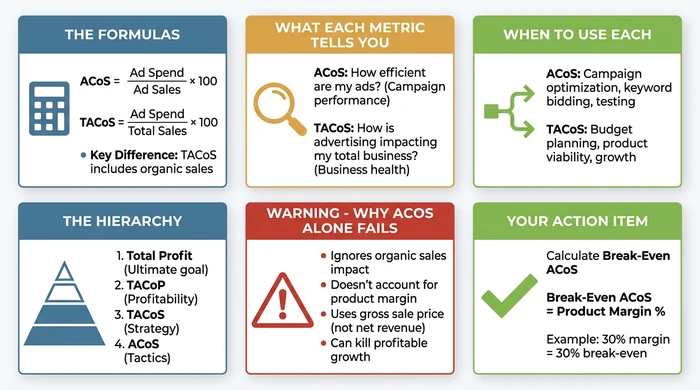
ACoS (Advertising Cost of Sales) measures how much you’re spending on advertising relative to the sales those ads directly generate. TACoS (Total Advertising Cost of Sales) measures advertising spend relative to all your sales, including both ad-driven and organic sales. The critical distinction is that ACoS only includes sales directly attributed to ad clicks, while TACoS includes your total sales.
The formulas reveal the difference:
Complete comparison of ACoS vs TACoS showing formulas, use cases, limitations, and strategic hierarchy
TACoS is always lower than ACoS because total sales are always greater than or equal to ad-attributed sales alone. When TACoS is significantly lower than ACoS, it indicates advertising is successfully driving organic sales. The gap between these two metrics reveals the hidden value of your advertising - the organic momentum it creates beyond direct ad clicks.
| Metric | Formula | What It Measures | Typical Range |
|---|---|---|---|
| ACoS | (Ad Spend / Ad Sales) × 100 | Ad campaign efficiency | 20-40% |
| TACoS | (Ad Spend / Total Sales) × 100 | Advertising’s total business impact | 7-25% |
How to Calculate ACoS and TACoS
Calculating both metrics requires data from two different Amazon reports. Ad Spend and Ad Sales come from your Amazon Advertising Console, while Total Sales comes from Business Reports in Seller Central.
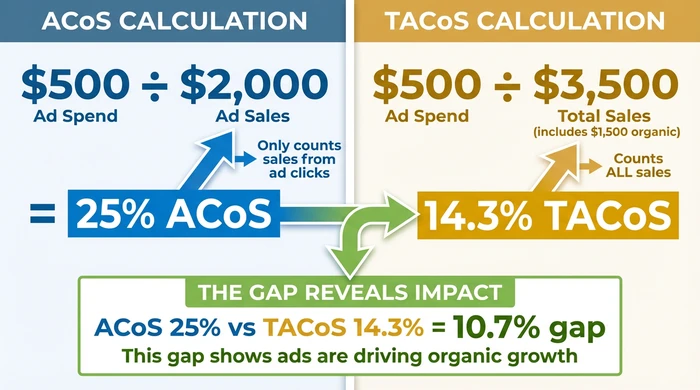
For ACoS, you divide your advertising spend by the sales attributed to those ads. Here’s a concrete example: if you spent $500 on ads and those ads generated $2,000 in sales, your ACoS is ($500 / $2,000) × 100 = 25%. This tells you that you’re spending 25 cents on advertising for every dollar of ad-driven sales.
Real-world example showing how the same advertising spend produces different ACoS and TACoS percentages, revealing organic sales impact
For TACoS, you use the same $500 ad spend but divide by your total sales. If your product generated $3,500 in total sales (the $2,000 from ads plus $1,500 in organic sales), your TACoS is ($500 / $3,500) × 100 = 14.3%. This reveals that advertising accounts for 14.3% of your total business, not just 25% of ad-driven sales.
The common mistake sellers make is forgetting to include all sales channels when calculating TACoS. Seller Central shows total sales across all channels, while the Advertising Console only shows ad-attributed sales. You need both reports to calculate TACoS accurately.
When to Use ACoS vs TACoS: The Strategic Metric Hierarchy
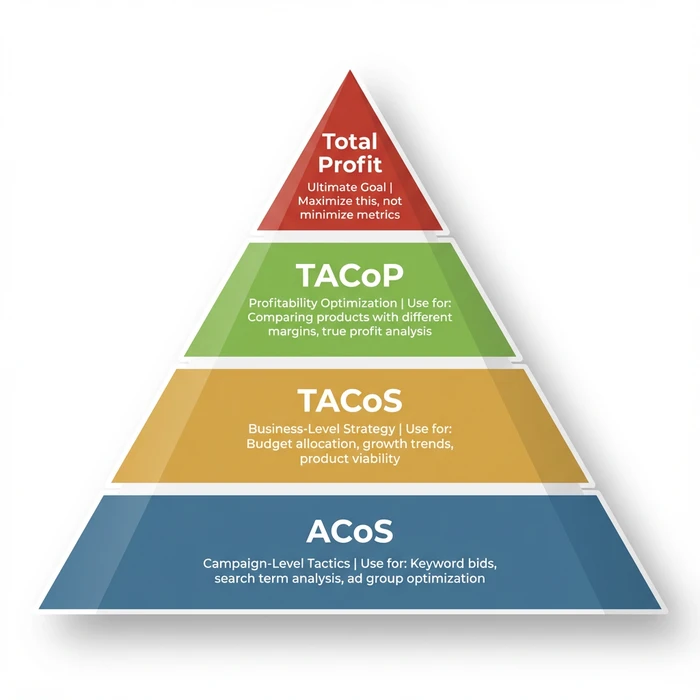
Different metrics serve different decision types. Using the wrong metric for a decision leads to optimization errors that can damage profitability. The fundamental principle is to match the metric to the scope of your decision.
ACoS is your campaign-level tactical optimization metric. Use it when you’re adjusting keyword bids, analyzing search term performance, testing new ad groups, or evaluating individual campaign efficiency. For example, if Keyword X has 45% ACoS while your target is 30%, you’d reduce the bid by 20% to improve efficiency. ACoS works here because you’re measuring the direct efficiency of specific advertising actions.
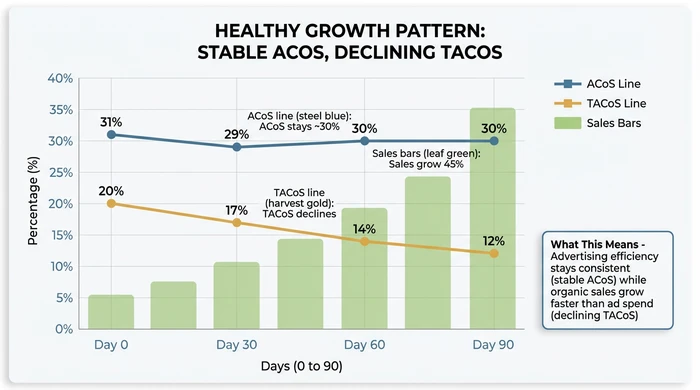
TACoS is your business-level strategic decision metric. Use it when you’re setting overall ad budgets, evaluating product viability, analyzing growth trends, or assessing advertising’s ROI on your total business. For example, if TACoS decreased from 18% to 12% over 90 days while sales grew 40%, it indicates advertising is driving organic momentum - you should increase budget. TACoS works here because it captures the total business impact including the organic halo effect of advertising.
The strategic metric hierarchy showing which metric to use for different types of optimization decisions
The decision matrix below shows exactly which metric to check for your specific optimization task:
| I Need To... | Metric to Check | Why This Metric | Example Action |
|---|---|---|---|
| Adjust bids for specific keywords | ACoS by keyword/search term | Campaign-level efficiency | Keyword "amazon ppc tool" has 55% ACoS, reduce bid from $2.00 to $1.50 |
| Decide overall monthly ad budget | TACoS trend (90-day) | Business-level health indicator | TACoS declined from 20% to 14% while sales grew 35%, increase budget by 20% to capitalize on momentum |
| Evaluate if a new product launch is working | ACoS + Sales Volume + TACoS | Launch validation (efficiency + scale + total impact) | 60% ACoS is high but sales volume validates demand, continue for 60 more days and monitor TACoS decline |
| Determine if a campaign is profitable | Actual ACoS vs Break-Even ACoS | True profitability check | Break-even is 35%, campaign running at 32%, continue with current strategy |
| Assess if advertising is driving organic growth | ACoS vs TACoS gap | Organic momentum indicator | ACoS is 28%, TACoS is 12%, gap of 16% shows strong organic sales driven by ads |
| Compare performance across products with different margins | TACoP or Total Profit | Apples-to-apples profitability | Product A: 25% ACoS, $5,000 profit. Product B: 40% ACoS, $8,000 profit. B is better despite higher ACoS |
| Decide if I should pause/stop a campaign | Total Profit contribution | Ultimate business value | Campaign generates $12,000 profit monthly at 45% ACoS - do NOT pause despite "high" ACoS |
| Set ACoS targets for multiple products | Break-Even ACoS per product | Product-specific profitability | Product A (40% margin) = 35% target ACoS. Product B (25% margin) = 20% target ACoS |
This matrix solves the confusion most sellers face: they check ACoS when they should be checking TACoS, or they use TACoS for tactical decisions better served by ACoS. Match the metric to the decision type and you’ll avoid costly optimization errors.
Why ACoS Alone is a Dangerously Misleading Metric
Understanding ACoS’s limitations is critical for making profitable optimization decisions. Most sellers treat ACoS as their primary success metric without realizing it’s fundamentally flawed for profitability analysis.
ACoS uses the gross sale price, not your actual revenue. Amazon deducts referral fees (typically 15%), FBA fees, and sales tax before you receive payment. For many products, sellers receive only 50% of the final sale price after all deductions. Understanding these Amazon fees is essential for accurate profitability calculations. This means a 20% ACoS is actually consuming 40% of your net revenue, not 20%.
“Uses ultimate sale price which is subject to deductions (sales tax, Amazon referral fee, Amazon FBA fee). With boxes of sweets, we may only receive 50% of the final sale price” - Amazon Advertising Optimization Guidelines
ACoS ignores product margin, making generic benchmarks meaningless. A 30% ACoS is profitable for a product with 35% margin but loss-making for a product with 25% margin. You cannot evaluate ACoS performance without knowing your specific product margin. The benchmark “aim for 30% ACoS” is dangerously misleading because it treats all products identically when profitability is product-dependent.
“20% ACoS is profitable for a product with 25% GM but loss-making for a product with 18% GM. Consequence: It is impossible to say what a ‘good’ ACoS is because it depends on the profitability of the product” - Amazon Advertising Optimization Guidelines
Calculate your break-even ACoS using this formula:
Step 2: Net Revenue = Sale Price - Total Amazon Fees
Step 3: Gross Profit = Net Revenue - COGS
Step 4: Product Margin % = (Gross Profit / Sale Price) × 100
Step 5: Break-Even ACoS = Product Margin %
Example:
- Product Sale Price = $30.00
- COGS = $8.00
- Referral Fee (15%) = $4.50
- FBA Fee = $5.20
- Other Fees = $0.30
Total Amazon Fees = $10.00 Net Revenue = $20.00 Gross Profit = $12.00 Product Margin % = 40% Break-Even ACoS = 40%
If your ACoS is below 40%, you’re profitable on each sale. If it’s above 40%, you’re losing money on every ad-driven sale. This is why generic benchmarks fail - your break-even point is unique to your product economics.
ACoS doesn’t measure advertising’s effect on organic sales. Successful advertising improves organic ranking through sales velocity and conversion signals. When you cut a campaign with “high” ACoS, you may eliminate the organic sales it was generating. This is why TACoS trends matter more than ACoS snapshots for strategic decisions.
“Does not account for advertising effect on organic sales” - Amazon Advertising Optimization Guidelines
The real-world consequence is that sellers who only optimize for low ACoS often kill profitable overall growth. Reducing ACoS by cutting successful campaigns can decrease total profitability.
“This is a very poor objective for all reasons outlined above. It takes no account of profit and risks stopping profitable search terms in order to achieve a false goal” - Amazon Advertising Optimization Guidelines on “Reducing ACoS”
Understanding TACoS as a Business Health Metric
TACoS trends reveal what’s actually happening with your total business, not just your advertising campaigns. The pattern of TACoS movement tells you whether advertising is building sustainable growth or creating advertising dependency.
Decreasing TACoS with stable or growing sales is the healthiest pattern. It indicates advertising is successfully driving organic momentum. Your ads are improving your organic ranking, and organic sales are growing faster than your ad spend. This is sustainable, profitable growth.
Increasing TACoS with growing sales means advertising is scaling proportionally with your business. You’re growing, but you remain heavily dependent on advertising. This isn’t necessarily bad for new products building market share, but it requires monitoring. If TACoS keeps rising, you’re not building organic sustainability.
Decreasing TACoS with declining sales is a warning sign. You may have cut ad spend, which made TACoS look better, but you lost total revenue. This is the “shrinking to profitability” mistake - you improved the metric while damaging the business.
Stable TACoS with growing sales indicates healthy scaling. Advertising and organic are growing together proportionally. You’re maintaining efficiency while expanding total business.
Healthy growth pattern showing stable ACoS with declining TACoS over 90 days, indicating advertising is building organic momentum
Target TACoS benchmarks vary by product lifecycle stage. New product launches typically run 15-25% TACoS because you’re investing heavily in visibility before organic momentum exists. Mature established products should target 7-15% TACoS because strong organic momentum reduces reliance on paid traffic. Seasonal products may deliberately accept higher TACoS during positioning periods (like September-October for Christmas products) to build ranking before peak season.
“Product launches, positioning a product prior to peak sales period (e.g. Sept/Oct positioning of boxes of sweets in preparation for pre-Christmas sales peak)” - Amazon Advertising Optimization Guidelines on tactical exceptions
The TACoS improvement trap: decreasing TACoS sounds positive, but it can indicate under-investment. If you cut ad spend by 50% and TACoS drops from 20% to 12%, but total sales also drop 30%, you haven’t improved - you’ve shrunk. Always evaluate TACoS trends alongside total sales and total profit trends.
Advanced Metrics: TACoP and Total Profit
Beyond ACoS and TACoS lie metrics that measure actual profitability rather than cost efficiency ratios.
TACoP (Total Advertising Cost of Profit) measures advertising spend relative to actual profit after all costs. The formula is Ad Spend / (Total Profit), where profit equals revenue minus COGS, Amazon fees, and FBA fees. TACoP is superior to both ACoS and TACoS because it measures advertising cost against real profit, not gross sales.
“Far better metric. More involved to calculate but, when data is not combined, truly reflects performance. Calculates advertising spend relative to organic + advertising sales” - Amazon Advertising Optimization Guidelines
TACoP excels when comparing performance across products with different margins. Product A might have 25% ACoS generating $5,000 profit, while Product B has 40% ACoS generating $8,000 profit. Looking at ACoS alone suggests Product A performs better. Looking at total profit reveals Product B is superior despite higher ACoS.
Total Profit is the ultimate metric. ACoS and TACoS are efficiency metrics, but profit is the actual goal.
“Preferred metric. Increasing overall profit after deduction of advertising is the ultimate aim. Requires judgement on long-term vs short-term profit optimisation priority” - Amazon Advertising Optimization Guidelines
A campaign with 60% ACoS generating $10,000 profit is better than a campaign with 20% ACoS generating $3,000 profit. The strategic principle is to maximize total profit, not minimize percentage metrics. Sellers who chase low ACoS numbers often reduce total profitability in the process.
Common Mistakes: What NOT to Do
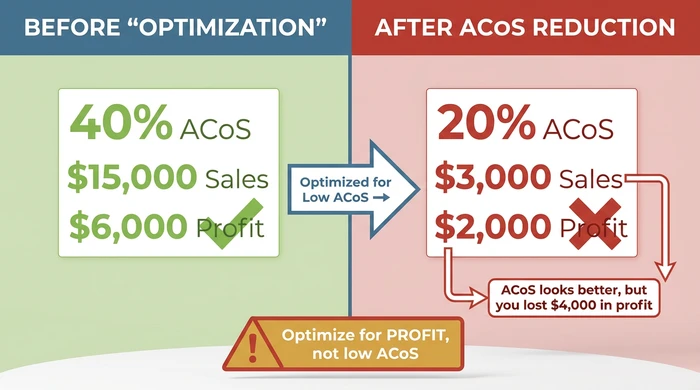
Real-world example showing how reducing ACoS from 40% to 20% actually decreased total profit by $4,000
Using the same ACoS target across all products creates systematic profitability errors. Different products have different margins. Product A with 40% margin can profitably sustain 35% ACoS. Product B with 20% margin loses money at 25% ACoS. Calculate break-even ACoS for each product based on its specific margin and set targets accordingly.
Treating generic benchmarks as universal targets ignores the fundamental reality that profitability depends on your specific product economics. “30% ACoS is good” is only true if your margin is above 30%. Set targets based on your actual margins and profit goals, not industry averages.
Optimizing to reduce ACoS without considering total profit impact leads to destructive decisions. Cutting a campaign from 40% ACoS to 25% ACoS sounds good, but if sales drop from $10,000 to $3,000, you reduced total profit from $6,000 to $2,250. Evaluate optimization changes based on total profit impact, not ACoS movement.
Ignoring the relationship between ACoS, TACoS, and organic sales misses the most valuable signal in your data. When ACoS and TACoS diverge significantly, advertising is driving organic growth. Optimizing only ACoS may kill the organic momentum. Monitor both metrics together and evaluate total sales trends.
Combining data from multiple products in ad groups makes profitability analysis impossible. When multiple products are in one ad group, you can’t determine which product accounts for impressions, clicks, spend, or sales. You can’t calculate accurate ACoS or TACoS per product, and you can’t identify which product pages need optimization. Use single-product ad groups for accurate attribution and optimization.
Variations & Exceptions
FAQ
Q: What is the difference between ACoS and TACoS on Amazon?
ACoS (Advertising Cost of Sales) measures ad spend relative to ad-attributed sales only, calculated as (Ad Spend / Ad Sales) × 100. TACoS (Total Advertising Cost of Sales) measures ad spend relative to all sales including organic, calculated as (Ad Spend / Total Sales) × 100. TACoS is always lower than ACoS and reveals advertising’s total impact on your business, including the organic sales momentum it creates.
Q: What is a good TACoS percentage for Amazon sellers?
Target 7-15% TACoS for mature established products with strong organic momentum. New product launches typically run 15-25% TACoS as they build visibility and ranking. Lower isn’t always better - if you’re under-investing in advertising, you may be leaving profitable growth on the table. The right TACoS depends on your product lifecycle stage and growth goals.
Q: How do you calculate TACoS?
Divide your total ad spend by your total sales and multiply by 100. Get Ad Spend from Amazon Advertising Console and Total Sales from Business Reports in Seller Central. For example, if you spent $500 on ads and generated $3,500 in total sales (including both ad and organic), your TACoS is ($500 / $3,500) × 100 = 14.3%.
Q: Is TACoS more important than ACoS?
Neither is universally more important - they serve different purposes. Use ACoS for campaign-level tactical decisions like keyword bidding and search term optimization. Use TACoS for business-level strategic decisions like overall budget allocation, product viability assessment, and growth trend analysis. The mistake is using a single metric for all decisions rather than matching the metric to the decision type.
Q: How can I improve my TACoS on Amazon?
Decreasing TACoS happens when organic sales grow faster than ad spend. Improve TACoS by optimizing listings to convert better (driving organic ranking), building external traffic sources, leveraging advertising to improve organic ranking through sales velocity signals, and ensuring ads target high-intent keywords that drive lasting rank improvements. Focus on building organic momentum rather than just reducing ad spend, which can shrink your total business.
Conclusion
ACoS and TACoS aren’t competing metrics - they form a strategic hierarchy where each serves specific decision types. The mistake isn’t tracking the wrong metric, it’s using a single metric for all decisions or optimizing metrics without considering total profit impact. For a deeper breakdown of all eight metrics that drive profit, including TACoP and Total Profit, see our guide to key Amazon PPC metrics.
Start by calculating your break-even ACoS based on product margin using the formula provided earlier. Use ACoS for tactical campaign optimization decisions like keyword bidding and search term analysis. Monitor TACoS trends for business health and strategic budget allocation. Always evaluate changes based on their impact on total profit, not just movement in percentage metrics.
For sellers serious about profitability optimization at the search term level, tools like AdRazor can help consolidate search term analysis while tracking both ACoS and TACoS trends across your account. The platform removes Amazon’s 60-day data limitation and shows you exactly which search terms are profitable using the right optimization level.
The gap between your ACoS and TACoS reveals advertising’s hidden value - the organic momentum it creates. Don’t kill that momentum by chasing low ACoS numbers. Optimize for profit, not vanity metrics.
Track ACoS and TACoS Effectively
Understanding ACoS vs TACoS is just the start. AdRazor makes it easy to:
- See profitability at a glance - Traffic-light color-coding instantly shows which search terms exceed your break-even ACoS
- Track trends over time - Go beyond Amazon’s 60-day limit for seasonal and long-term analysis
- Focus on what matters - Consolidated search term data reveals true performance
- Make profitable decisions - Optimize for real profitability, not just low ACoS
Calculate Your ACoS Free | See Why AdRazor Works | Start Free Trial